<?xml version="1.0" encoding="utf-8"?><feed xmlns="http://www.w3.org/2005/Atom" ><generator uri="https://jekyllrb.com/" version="3.10.0">Jekyll</generator><link href="http://tuhrig.de/feed.xml" rel="self" type="application/atom+xml" /><link href="http://tuhrig.de/" rel="alternate" type="text/html" /><updated>2025-11-19T08:26:21+00:00</updated><id>http://tuhrig.de/feed.xml</id><title type="html">Thomas Uhrig’s Blog</title><subtitle>My personal blog about software development since 2010</subtitle><author><name>Thomas Uhrig</name></author><entry><title type="html">Connector-Based RAG With Live Confluence Data</title><link href="http://tuhrig.de/connector-rag/" rel="alternate" type="text/html" title="Connector-Based RAG With Live Confluence Data" /><published>2025-11-18T00:00:00+00:00</published><updated>2025-11-18T00:00:00+00:00</updated><id>http://tuhrig.de/connector-rag</id><content type="html" xml:base="http://tuhrig.de/connector-rag/"><![CDATA[<p>In my last post (<a href="https://tuhrig.de/local-rag">How to Build Your Own Local RAG System</a>) I showed how to build a fully local Retrieval-Augmented Generation (RAG) setup using <strong>pre-processed data</strong>.
That approach works well, but it also has a downside:
<strong>Your data becomes stale unless you regularly rebuild your embeddings.</strong>
Here, I want to show a completely different approach, for enhancing your LLM with your very own <a href="https://www.atlassian.com/de/software/confluence">Confluence</a> data.</p>

<h2 id="a-connector-based-rag-system">A Connector-Based RAG System</h2>

<p>Instead of preparing data upfront, we simply fetch it <strong>ad-hoc</strong> from Confluence using the official REST API.</p>

<ol>
  <li>User asks a question</li>
  <li>The LLM generates search keywords from the question</li>
  <li>A Java client queries Confluence via its REST-API</li>
  <li>Matching pages are fetched</li>
  <li>Their content becomes the RAG context</li>
</ol>

<p>Just a connector → Confluence → the LLM. 
It’s a “just-in-time RAG” without any preprocessing step.</p>

<h2 id="1-confluenceclientjava">1. <code class="language-plaintext highlighter-rouge">ConfluenceClient.java</code></h2>

<p>First, we need to build our way to read Confluence.
So this class will do two things:</p>

<ul>
  <li>Perform a <a href="https://developer.atlassian.com/server/confluence/advanced-searching-using-cql/">CQL</a> (<strong>C</strong>onfluence <strong>Q</strong>uery <strong>L</strong>anguage) search</li>
  <li>Fetch a page’s content (<code class="language-plaintext highlighter-rouge">HTML</code>), which is then stripped and cleaned to plain text</li>
</ul>

<p>Below is a shortened version of the code.
In the end, it’s just a Java client which calls a REST-API.
To do so, Confluence offers the so-called <a href="https://confluence.atlassian.com/enterprise/using-personal-access-tokens-1026032365.html">personal access token</a>.</p>

<div class="language-java highlighter-rouge"><div class="highlight"><pre class="highlight"><code><span class="kd">public</span> <span class="kd">class</span> <span class="nc">ConfluenceClient</span> <span class="o">{</span>

  <span class="kd">private</span> <span class="kd">final</span> <span class="nc">String</span> <span class="n">baseUrl</span> <span class="o">=</span> <span class="s">"https://my-confluence.de/confluence"</span><span class="o">;</span>
  <span class="kd">private</span> <span class="kd">final</span> <span class="nc">String</span> <span class="n">pat</span> <span class="o">=</span> <span class="s">"PERSONAL-ACCESS-TOKEN"</span><span class="o">;</span>

  <span class="kd">public</span> <span class="nc">JsonNode</span> <span class="nf">search</span><span class="o">(</span><span class="nc">String</span> <span class="n">query</span><span class="o">)</span> <span class="o">{</span>
    <span class="nc">String</span> <span class="n">cql</span> <span class="o">=</span> <span class="n">buildCql</span><span class="o">(</span><span class="n">query</span><span class="o">);</span>
    <span class="nc">String</span> <span class="n">url</span> <span class="o">=</span> <span class="n">baseUrl</span> <span class="o">+</span> <span class="s">"/rest/api/search?cql="</span> <span class="o">+</span> <span class="n">encode</span><span class="o">(</span><span class="n">cql</span><span class="o">);</span>
    <span class="nc">HttpRequest</span> <span class="n">req</span> <span class="o">=</span> <span class="n">request</span><span class="o">(</span><span class="n">url</span><span class="o">);</span>
    <span class="nc">String</span> <span class="n">body</span> <span class="o">=</span> <span class="n">send</span><span class="o">(</span><span class="n">req</span><span class="o">);</span>
    <span class="k">return</span> <span class="no">MAPPER</span><span class="o">.</span><span class="na">readTree</span><span class="o">(</span><span class="n">body</span><span class="o">);</span>
  <span class="o">}</span>

  <span class="kd">public</span> <span class="nc">JsonNode</span> <span class="nf">getPage</span><span class="o">(</span><span class="nc">String</span> <span class="n">id</span><span class="o">)</span> <span class="o">{</span>
    <span class="kt">var</span> <span class="n">url</span> <span class="o">=</span> <span class="n">baseUrl</span> <span class="o">+</span> <span class="s">"/rest/api/content/"</span> <span class="o">+</span> <span class="n">id</span> <span class="o">+</span> <span class="s">"?expand=body.storage"</span><span class="o">;</span>
    <span class="kt">var</span> <span class="n">req</span> <span class="o">=</span> <span class="n">request</span><span class="o">(</span><span class="n">url</span><span class="o">);</span>
    <span class="kt">var</span> <span class="n">body</span> <span class="o">=</span> <span class="n">send</span><span class="o">(</span><span class="n">req</span><span class="o">);</span>
    <span class="k">return</span> <span class="no">MAPPER</span><span class="o">.</span><span class="na">readTree</span><span class="o">(</span><span class="n">body</span><span class="o">);</span>
  <span class="o">}</span>

  <span class="kd">private</span> <span class="nc">String</span> <span class="nf">buildCql</span><span class="o">(</span><span class="nc">String</span> <span class="n">query</span><span class="o">)</span> <span class="o">{</span>
    <span class="c1">// Example output:</span>
    <span class="c1">//   space in ("MY-SPACE","YOUR-SPACE") AND type = "page" AND (text ~ "animal" OR text ~ "human")</span>
    <span class="o">...</span>
  <span class="o">}</span>

  <span class="kd">private</span> <span class="nc">HttpRequest</span> <span class="nf">request</span><span class="o">(</span><span class="nc">String</span> <span class="n">url</span><span class="o">)</span> <span class="o">{</span> <span class="o">...</span> <span class="o">}</span>
  <span class="kd">private</span> <span class="nc">String</span> <span class="nf">send</span><span class="o">(</span><span class="nc">HttpRequest</span> <span class="n">req</span><span class="o">)</span> <span class="o">{</span> <span class="o">...</span> <span class="o">}</span>
<span class="o">}</span>

</code></pre></div></div>

<h1 id="2-llm-generates-search-keywords">2. LLM Generates Search Keywords</h1>

<p>But before we even hit Confluence, the LLM produces 3–5 high-quality keywords from the user’s question.
This step avoids sending full questions with stopwords to the Confluence search API.</p>

<div class="language-java highlighter-rouge"><div class="highlight"><pre class="highlight"><code><span class="kd">public</span> <span class="nc">String</span><span class="o">[]</span> <span class="nf">extractSearchKeywords</span><span class="o">(</span><span class="nc">String</span> <span class="n">question</span><span class="o">)</span> <span class="o">{</span>

  <span class="kt">var</span> <span class="n">systemPrompt</span> <span class="o">=</span> <span class="s">"""
      You get a question related to our internal Confluence.
      Produce 3-5 relevant search terms.
      No stopwords, no sentences, only domain terminology.
      Return a comma-separated list.
      """</span><span class="o">;</span>

  <span class="kt">var</span> <span class="n">response</span> <span class="o">=</span> <span class="n">callOpenAI</span><span class="o">(</span><span class="n">systemPrompt</span><span class="o">,</span> <span class="n">question</span><span class="o">);</span>
  <span class="k">return</span> <span class="n">response</span>
      <span class="o">.</span><span class="na">toLowerCase</span><span class="o">()</span>
      <span class="o">.</span><span class="na">replaceAll</span><span class="o">(</span><span class="s">"[^a-z0-9öäüß, ]"</span><span class="o">,</span> <span class="s">" "</span><span class="o">)</span>
      <span class="o">.</span><span class="na">split</span><span class="o">(</span><span class="s">"[, ]+"</span><span class="o">);</span>
<span class="o">}</span>
</code></pre></div></div>

<h1 id="3-putting-it-all-together-answerquestion">3. Putting it all together: <code class="language-plaintext highlighter-rouge">answerQuestion()</code></h1>

<p>Now we can put it all together:</p>

<ul>
  <li>We have implemented a simple Java client to read Confluence</li>
  <li>We use the LLM to convert the user’s questions to search keywords</li>
  <li>Now we can query Confluence and build a RAG context with its search results</li>
</ul>

<div class="language-java highlighter-rouge"><div class="highlight"><pre class="highlight"><code><span class="kd">public</span> <span class="nc">String</span> <span class="nf">answerQuestion</span><span class="o">(</span><span class="nc">String</span> <span class="n">question</span><span class="o">)</span> <span class="kd">throws</span> <span class="nc">Exception</span> <span class="o">{</span>

  <span class="c1">// 1) Let the LLM decide which keywords to search for</span>
  <span class="nc">String</span><span class="o">[]</span> <span class="n">keywords</span> <span class="o">=</span> <span class="n">extractSearchKeywords</span><span class="o">(</span><span class="n">question</span><span class="o">);</span>
  <span class="nc">String</span> <span class="n">keywordQuery</span> <span class="o">=</span> <span class="nc">String</span><span class="o">.</span><span class="na">join</span><span class="o">(</span><span class="s">" "</span><span class="o">,</span> <span class="n">keywords</span><span class="o">);</span>

  <span class="c1">// 2) Search Confluence</span>
  <span class="nc">JsonNode</span> <span class="n">results</span> <span class="o">=</span> <span class="n">confluence</span><span class="o">.</span><span class="na">search</span><span class="o">(</span><span class="n">keywordQuery</span><span class="o">).</span><span class="na">path</span><span class="o">(</span><span class="s">"results"</span><span class="o">);</span>

  <span class="k">if</span> <span class="o">(</span><span class="n">results</span><span class="o">.</span><span class="na">isEmpty</span><span class="o">())</span> <span class="o">{</span>
    <span class="k">return</span> <span class="s">"No relevant Confluence data found."</span><span class="o">;</span>
  <span class="o">}</span>

  <span class="c1">// 3) Build context by loading up to 10 pages</span>
  <span class="nc">StringBuilder</span> <span class="n">ctx</span> <span class="o">=</span> <span class="k">new</span> <span class="nc">StringBuilder</span><span class="o">();</span>
  <span class="k">for</span> <span class="o">(</span><span class="nc">JsonNode</span> <span class="n">r</span> <span class="o">:</span> <span class="n">results</span><span class="o">)</span> <span class="o">{</span>
    <span class="nc">String</span> <span class="n">id</span> <span class="o">=</span> <span class="n">r</span><span class="o">.</span><span class="na">path</span><span class="o">(</span><span class="s">"content"</span><span class="o">).</span><span class="na">path</span><span class="o">(</span><span class="s">"id"</span><span class="o">).</span><span class="na">asText</span><span class="o">();</span>
    <span class="nc">JsonNode</span> <span class="n">page</span> <span class="o">=</span> <span class="n">confluence</span><span class="o">.</span><span class="na">getPage</span><span class="o">(</span><span class="n">id</span><span class="o">);</span>

    <span class="nc">String</span> <span class="n">html</span> <span class="o">=</span> <span class="n">page</span><span class="o">.</span><span class="na">path</span><span class="o">(</span><span class="s">"body"</span><span class="o">).</span><span class="na">path</span><span class="o">(</span><span class="s">"storage"</span><span class="o">).</span><span class="na">path</span><span class="o">(</span><span class="s">"value"</span><span class="o">).</span><span class="na">asText</span><span class="o">();</span>
    <span class="nc">String</span> <span class="n">text</span> <span class="o">=</span> <span class="n">stripHtml</span><span class="o">(</span><span class="n">html</span><span class="o">);</span>

    <span class="n">ctx</span><span class="o">.</span><span class="na">append</span><span class="o">(</span><span class="s">"=== "</span><span class="o">).</span><span class="na">append</span><span class="o">(</span><span class="n">page</span><span class="o">.</span><span class="na">path</span><span class="o">(</span><span class="s">"title"</span><span class="o">).</span><span class="na">asText</span><span class="o">()).</span><span class="na">append</span><span class="o">(</span><span class="s">" ===\n"</span><span class="o">);</span>
    <span class="n">ctx</span><span class="o">.</span><span class="na">append</span><span class="o">(</span><span class="n">text</span><span class="o">).</span><span class="na">append</span><span class="o">(</span><span class="s">"\n\n"</span><span class="o">);</span>
  <span class="o">}</span>

  <span class="c1">// 4) Ask the LLM based on this context</span>
  <span class="nc">String</span> <span class="n">systemPrompt</span> <span class="o">=</span> <span class="s">"""
      You answer strictly based on the Confluence context.
      If the answer is not in the context, say:
      "</span><span class="nc">The</span> <span class="nc">Confluence</span> <span class="n">data</span> <span class="n">does</span> <span class="n">not</span> <span class="n">contain</span> <span class="n">the</span> <span class="n">answer</span><span class="o">.</span><span class="s">"
      """</span><span class="o">;</span>

  <span class="nc">String</span> <span class="n">userPrompt</span> <span class="o">=</span> <span class="s">"""
      QUESTION:
      %s

      CONTEXT:
      %s
      """</span><span class="o">.</span><span class="na">formatted</span><span class="o">(</span><span class="n">question</span><span class="o">,</span> <span class="n">ctx</span><span class="o">.</span><span class="na">toString</span><span class="o">());</span>

  <span class="k">return</span> <span class="nf">callOpenAI</span><span class="o">(</span><span class="n">systemPrompt</span><span class="o">,</span> <span class="n">userPrompt</span><span class="o">);</span>
<span class="o">}</span>
</code></pre></div></div>

<h1 id="4-main-class-to-run-it">4. Main class to run it</h1>

<p>Now we can go ahead and ask a question:</p>

<div class="language-java highlighter-rouge"><div class="highlight"><pre class="highlight"><code><span class="kd">public</span> <span class="kd">class</span> <span class="nc">Main</span> <span class="o">{</span>
  <span class="kd">public</span> <span class="kd">static</span> <span class="kt">void</span> <span class="nf">main</span><span class="o">(</span><span class="nc">String</span><span class="o">[]</span> <span class="n">args</span><span class="o">)</span> <span class="kd">throws</span> <span class="nc">Exception</span> <span class="o">{</span>
    <span class="nc">AiAgent</span> <span class="n">agent</span> <span class="o">=</span> <span class="k">new</span> <span class="nc">AiAgent</span><span class="o">();</span>
    <span class="nc">String</span> <span class="n">answer</span> <span class="o">=</span> <span class="n">agent</span><span class="o">.</span><span class="na">answerQuestion</span><span class="o">(</span><span class="s">"What is a report?"</span><span class="o">);</span>
    <span class="nc">System</span><span class="o">.</span><span class="na">out</span><span class="o">.</span><span class="na">println</span><span class="o">(</span><span class="n">answer</span><span class="o">);</span>
  <span class="o">}</span>
<span class="o">}</span>
</code></pre></div></div>

<h2 id="the-magic-no-vector-store-needed">The Magic: No Vector Store Needed</h2>

<p>This approach is super simple:</p>

<ul>
  <li>The LLM itself creates the search query</li>
  <li>Confluence returns only relevant pages</li>
  <li>The pages become the RAG context</li>
  <li>The LLM answers based on that context</li>
</ul>

<h2 id="-advantages">✅ Advantages</h2>

<ul>
  <li>Easy to build:
No embedding pipeline, no vector database, no chunking logic.</li>
  <li>Always up to date:
The answers always use live Confluence data.</li>
  <li>Minimal infrastructure:
Just Java + HTTP + your LLM endpoint.
Great for enterprise environments:
Works even if you cannot store data locally due to compliance restrictions.</li>
</ul>

<h2 id="-disadvantages">❌ Disadvantages</h2>

<ul>
  <li>You are limited by the Confluence search API:
CQL quality determines response quality.
If CQL can’t find it, the LLM can’t answer it.</li>
  <li>Potentially slow for large queries:
Each request triggers multiple Confluence API calls.</li>
  <li>No semantic search:
You rely on keyword-based text search, not embeddings.</li>
  <li>Rate limits:
Large teams or heavy usage may hit Confluence rate limits.</li>
</ul>

<h2 id="when-should-you-use-this-approach">When should you use this approach?</h2>

<h3 id="use-connector-based-rag-when-you-want">Use connector-based RAG when you want:</h3>

<ul>
  <li>fast development</li>
  <li>zero data preprocessing</li>
  <li>live data from Confluence</li>
  <li>minimal maintenance</li>
</ul>

<h3 id="use-local-vector-based-rag-as-in-my-previous-post-when">Use local vector-based RAG (as in my previous post) when:</h3>

<ul>
  <li>you need semantic search</li>
  <li>you want to customize chunking, scoring, ranking</li>
  <li>you want low latency and high throughput</li>
  <li>you need strong control over your retrieval logic</li>
</ul>

<p><strong>Best regards,</strong><br />
Thomas</p>]]></content><author><name>Thomas Uhrig</name></author><category term="tech" /><category term="AI" /><summary type="html"><![CDATA[In my last post (How to Build Your Own Local RAG System) I showed how to build a fully local Retrieval-Augmented Generation (RAG) setup using pre-processed data. That approach works well, but it also has a downside: Your data becomes stale unless you regularly rebuild your embeddings. Here, I want to show a completely different approach, for enhancing your LLM with your very own Confluence data.]]></summary></entry><entry><title type="html">How to Build Your Own Local RAG System</title><link href="http://tuhrig.de/local-rag/" rel="alternate" type="text/html" title="How to Build Your Own Local RAG System" /><published>2025-11-14T00:00:00+00:00</published><updated>2025-11-14T00:00:00+00:00</updated><id>http://tuhrig.de/local-rag</id><content type="html" xml:base="http://tuhrig.de/local-rag/"><![CDATA[<p>AI is all around, but when it comes to actually <em>using</em> it, many organizations move slow.
Discussions about data protection, governance, integrations, and vendor evaluations often block concrete use cases.
But here’s the surprising part:</p>

<p><strong>You don’t need a big platform or a six-month project to get started with AI on your internal knowledge base.</strong></p>

<p>You can build a fully local, privacy-friendly <strong>Retrieval-Augmented Generation (RAG)</strong> system in just a couple of hours.
No external dependencies.
No cloud vector databases.
No proprietary frameworks. 
Just a local embedding model, your internal documents, and a Large Language Model (LLM) endpoint.</p>

<p>This post shows you how.</p>

<h2 id="demo-project-on-github">Demo Project on GitHub</h2>

<p>You can find a demo project to this topic on my GitHub account:</p>

<p><a href="https://github.com/tuhrig/local-rag-java-gradle">https://github.com/tuhrig/local-rag-java-gradle</a></p>

<h2 id="what-we-are-building">What We Are Building</h2>

<p><a href="https://aws.amazon.com/what-is/retrieval-augmented-generation/">So what is RAG?</a> RAG systems use an LLM, after retrieving the most relevant pieces of your own documents.
Our documents can be anything from text files, to code or PDFs.
But in a typical company, it will pretty much be Confluence.
That’s where your knowledge of the last couple of years is buried.
So let’s give it back some life.</p>

<p>In practice, this results in a system like this:</p>

<ol>
  <li>You ask a question</li>
  <li>Your system searches through your documents</li>
  <li>It picks the most relevant text chunks</li>
  <li>It builds a huge context prompt including the found document parts</li>
  <li>It asks the LLM</li>
  <li>You get a context-grounded answer</li>
</ol>

<p>Technically, we will go through the following steps:</p>

<div class="language-plaintext highlighter-rouge"><div class="highlight"><pre class="highlight"><code>                     ┌────────────────────────┐
                     │   1. Extract Content   │
                     │  (Confluence API, PDFs)│
                     └─────────────┬──────────┘
                                   ▼
                     ┌────────────────────────┐
                     │     2. Clean &amp; Chunk   │
                     │   HTML → text → chunks │
                     └─────────────┬──────────┘
                                   ▼
            ┌──────────────────────────────────────────┐
            │         3. Embed &amp; Store Chunks          │
            │  local embeddings → JSON vector files    │
            └────────────────────────┬─────────────────┘
                                     ▼
                     ┌────────────────────────┐
                     │   4. Similarity Search │
                     └─────────────┬──────────┘
                                   ▼
          ┌────────────────────────────────────┐
          │      5. Build Prompt &amp; Query LLM   │
          │  (inject context → call LLM)       │
          └──────────────────────────┬─────────┘
                                     ▼
                     ┌────────────────────────┐
                     │      Final Answer      │
                     └────────────────────────┘
</code></pre></div></div>

<h2 id="step-1-extract-your-internal-content">Step 1: Extract Your Internal Content</h2>

<p>Most companies use something like Confluence to share their internal knowledge.
Whatever you have — if it has an API or can export PDFs, you can get the content.
But for Confluence in particular, it’s very convenient because of its REST-API:</p>

<div class="language-text highlighter-rouge"><div class="highlight"><pre class="highlight"><code>GET /rest/api/content?spaceKey=ABC&amp;limit=...&amp;expand=body.storage
</code></pre></div></div>

<p>Using this endpoint, you can paginate through all pages of a space and download them as JSON.
Here’s a minimal Java example that retrieves every page from a Confluence space and stores the results as individual JSON files:</p>

<div class="language-plaintext highlighter-rouge"><div class="highlight"><pre class="highlight"><code>var client = HttpClient.newHttpClient();
var mapper = new ObjectMapper();

var baseUrl = "https://your-confluence-domain/rest/api/content";
var spaceKey = "ABC";
int limit = 50;
int start = 0;

while (true) {
    var url = baseUrl 
            + "?spaceKey=" + spaceKey 
            + "&amp;limit=" + limit 
            + "&amp;start=" + start 
            + "&amp;expand=body.storage";

    var req = HttpRequest.newBuilder()
            .uri(URI.create(url))
            .header("Authorization", "Bearer &lt;YOUR_TOKEN&gt;")
            .build();

    var resp = client.send(req, HttpResponse.BodyHandlers.ofString());
    var root = mapper.readTree(resp.body());
    var results = root.get("results");

    if (results == null || !results.isArray() || results.size() == 0) {
        break;
    }

    for (var page : results) {
        var id = page.get("id").asText();
        var out = new File("raw_pages/" + id + ".json");
        mapper.writerWithDefaultPrettyPrinter().writeValue(out, page);
    }

    int size = results.size();
    if (size &lt; limit) {
        break; // no more pages
    }
    start += limit;
}
</code></pre></div></div>

<p>After running this script, your local download folder might look like this:</p>

<div class="language-plaintext highlighter-rouge"><div class="highlight"><pre class="highlight"><code>raw_pages/
  123456.json
  123457.json
  123458.json
  123459.json
  ...
</code></pre></div></div>

<p>Each file contains a full Confluence page in JSON format — including its ID, title, metadata, and HTML content (body.storage.value).</p>

<h2 id="step-2-clean-the-html-content">Step 2: Clean the HTML Content</h2>

<p>Before we can embed the text, we should convert the HTML into clean, readable plain text:</p>

<ul>
  <li>remove tags</li>
  <li>remove boilerplate (menus, macros, metadata)</li>
  <li>normalize whitespace</li>
  <li>keep only the meaningful textual content</li>
</ul>

<p>The easiest way to do this in Java is using <strong><a href="https://jsoup.org/">Jsoup</a></strong>, a lightweight HTML parser.</p>

<p>Here is a minimal snippet that takes the downloaded Confluence JSON files, extracts the HTML, and converts it to plain text:</p>

<div class="language-java highlighter-rouge"><div class="highlight"><pre class="highlight"><code><span class="kt">var</span> <span class="n">inputDir</span> <span class="o">=</span> <span class="k">new</span> <span class="nc">File</span><span class="o">(</span><span class="s">"raw_pages"</span><span class="o">);</span>
<span class="kt">var</span> <span class="n">outputDir</span> <span class="o">=</span> <span class="k">new</span> <span class="nc">File</span><span class="o">(</span><span class="s">"clean_pages"</span><span class="o">);</span>
<span class="n">outputDir</span><span class="o">.</span><span class="na">mkdirs</span><span class="o">();</span>

<span class="k">for</span> <span class="o">(</span><span class="kt">var</span> <span class="n">file</span> <span class="o">:</span> <span class="n">inputDir</span><span class="o">.</span><span class="na">listFiles</span><span class="o">((</span><span class="n">d</span><span class="o">,</span> <span class="n">n</span><span class="o">)</span> <span class="o">-&gt;</span> <span class="n">n</span><span class="o">.</span><span class="na">endsWith</span><span class="o">(</span><span class="s">".json"</span><span class="o">)))</span> <span class="o">{</span>
    <span class="kt">var</span> <span class="n">root</span> <span class="o">=</span> <span class="n">mapper</span><span class="o">.</span><span class="na">readTree</span><span class="o">(</span><span class="n">file</span><span class="o">);</span>
    <span class="kt">var</span> <span class="n">id</span> <span class="o">=</span> <span class="n">root</span><span class="o">.</span><span class="na">get</span><span class="o">(</span><span class="s">"id"</span><span class="o">).</span><span class="na">asText</span><span class="o">();</span>
    <span class="kt">var</span> <span class="n">body</span> <span class="o">=</span> <span class="n">root</span><span class="o">.</span><span class="na">path</span><span class="o">(</span><span class="s">"body"</span><span class="o">).</span><span class="na">path</span><span class="o">(</span><span class="s">"storage"</span><span class="o">).</span><span class="na">path</span><span class="o">(</span><span class="s">"value"</span><span class="o">);</span>
    <span class="kt">var</span> <span class="n">html</span> <span class="o">=</span> <span class="n">body</span><span class="o">.</span><span class="na">isMissingNode</span><span class="o">()</span> <span class="o">?</span> <span class="s">""</span> <span class="o">:</span> <span class="n">body</span><span class="o">.</span><span class="na">asText</span><span class="o">();</span>
    <span class="kt">var</span> <span class="n">cleanText</span> <span class="o">=</span> <span class="nc">Jsoup</span><span class="o">.</span><span class="na">parse</span><span class="o">(</span><span class="n">html</span><span class="o">).</span><span class="na">text</span><span class="o">();</span>
    <span class="n">cleanText</span> <span class="o">=</span> <span class="n">cleanText</span><span class="o">.</span><span class="na">replaceAll</span><span class="o">(</span><span class="s">"\\s+"</span><span class="o">,</span> <span class="s">" "</span><span class="o">).</span><span class="na">trim</span><span class="o">();</span>
    <span class="kt">var</span> <span class="n">out</span> <span class="o">=</span> <span class="k">new</span> <span class="nc">File</span><span class="o">(</span><span class="n">outputDir</span><span class="o">,</span> <span class="n">id</span> <span class="o">+</span> <span class="s">".txt"</span><span class="o">);</span>
    <span class="kt">var</span><span class="o">.</span><span class="na">writeString</span><span class="o">(</span><span class="n">out</span><span class="o">.</span><span class="na">toPath</span><span class="o">(),</span> <span class="n">cleanText</span><span class="o">);</span>
<span class="o">}</span>
</code></pre></div></div>

<p>After running this step, your directory structure looks like this:</p>

<div class="language-plaintext highlighter-rouge"><div class="highlight"><pre class="highlight"><code>raw_pages/
  123456.json
  123457.json
  ...

clean_pages/
  123456.txt
  123457.txt
  ...
</code></pre></div></div>

<p>Each <code class="language-plaintext highlighter-rouge">.txt</code> file now contains a clean, normalized text representation of the corresponding Confluence page.
This content is ready for chunking and embedding in the following steps.</p>

<h2 id="step-3-chunk-the-documents">Step 3: Chunk the Documents</h2>

<p>Big documents don’t embed well.
So we split them into small pieces — for example 300–600 characters each.
Every chunk gets stored locally:</p>

<div class="language-text highlighter-rouge"><div class="highlight"><pre class="highlight"><code>{pageId}_{title}_chunk_{n}.json
</code></pre></div></div>

<p>To do so, we can also use some Jsoup and simple Java:</p>

<div class="language-plaintext highlighter-rouge"><div class="highlight"><pre class="highlight"><code>var inputDir = new File("clean_pages");   // contains 12345.txt etc.
var chunkDir = new File("chunks");
chunkDir.mkdirs();

int chunkSize = 600;
int overlap = 100;

for (var file : inputDir.listFiles((d, n) -&gt; n.endsWith(".txt"))) {

    var pageId = file.getName().replace(".txt", "");
    var text = Files.readString(file.toPath());

    text = text.replaceAll("\\s+", " ").trim();

    int index = 0;
    int start = 0;

    while (start &lt; text.length()) {

        int end = Math.min(start + chunkSize, text.length());
        String chunk = text.substring(start, end).trim();

        var node = mapper.createObjectNode();
        node.put("pageId", pageId);
        node.put("chunkIndex", index);
        node.put("text", chunk);

        var out = new File(chunkDir, pageId + "_chunk_" + index + ".json");

        mapper.writerWithDefaultPrettyPrinter().writeValue(out, node);

        index++;
        start = end - overlap;  // sliding window
        if (start &lt; 0) start = 0;
    }
}
</code></pre></div></div>

<p>This becomes your “source library”. 
Each <code class="language-plaintext highlighter-rouge">chunk_*.json</code> file contains:</p>

<ul>
  <li>the <code class="language-plaintext highlighter-rouge">pageId</code></li>
  <li>the <code class="language-plaintext highlighter-rouge">chunkIndex</code></li>
  <li>the cleaned text snippet</li>
</ul>

<p>In the next step, we will embed these files as the foundation for your vector store.</p>

<div class="language-plaintext highlighter-rouge"><div class="highlight"><pre class="highlight"><code>clean_pages/
  12345.txt
  12346.txt
  ...

chunks/
  12345_chunk_0.json
  12345_chunk_1.json
  12345_chunk_2.json
  12346_chunk_0.json
  ...
</code></pre></div></div>

<h2 id="step-4-create-embeddings-locally">Step 4: Create Embeddings Locally</h2>

<p>To perform semantic search (and find the most relevant documents to our question), we need a numerical representation (an embedding) for each text chunk.
We can easily run an embedding model locally, entirely offline.
For this example, we use the lightweight and well-established <strong>all-MiniLM-L6-v2</strong> embedding model, which is small, fast, and works great for document search.
You can download a full copy of the model as a ZIP file here:</p>

<p>👉 <a href="https://www.kaggle.com/datasets/sircausticmail/all-minilm-l6-v2zip">https://www.kaggle.com/datasets/sircausticmail/all-minilm-l6-v2zip</a></p>

<p>After downloading, unzip it into a folder like:</p>

<div class="language-plaintext highlighter-rouge"><div class="highlight"><pre class="highlight"><code>D:/embedding_models/all-MiniLM-L6-v2/
</code></pre></div></div>

<p>Once the model is available locally, we expose it via a tiny <a href="https://flask.palletsprojects.com/en/stable/">Python Flask</a> service. 
This allows any application (e.g., our Java tooling) to request embeddings via a simple HTTP call.</p>

<div class="language-python highlighter-rouge"><div class="highlight"><pre class="highlight"><code><span class="kn">from</span> <span class="nn">flask</span> <span class="kn">import</span> <span class="n">Flask</span><span class="p">,</span> <span class="n">request</span><span class="p">,</span> <span class="n">jsonify</span>
<span class="kn">from</span> <span class="nn">sentence_transformers</span> <span class="kn">import</span> <span class="n">SentenceTransformer</span>

<span class="n">app</span> <span class="o">=</span> <span class="n">Flask</span><span class="p">(</span><span class="n">__name__</span><span class="p">)</span>

<span class="c1"># Path to your downloaded model folder
</span><span class="n">MODEL_PATH</span> <span class="o">=</span> <span class="sa">r</span><span class="s">"D:\embedding_models\all-MiniLM-L6-v2"</span>

<span class="k">print</span><span class="p">(</span><span class="s">"Loading model from:"</span><span class="p">,</span> <span class="n">MODEL_PATH</span><span class="p">)</span>
<span class="n">model</span> <span class="o">=</span> <span class="n">SentenceTransformer</span><span class="p">(</span><span class="n">MODEL_PATH</span><span class="p">)</span>

<span class="o">@</span><span class="n">app</span><span class="p">.</span><span class="n">route</span><span class="p">(</span><span class="s">"/embed"</span><span class="p">,</span> <span class="n">methods</span><span class="o">=</span><span class="p">[</span><span class="s">"POST"</span><span class="p">])</span>
<span class="k">def</span> <span class="nf">embed</span><span class="p">():</span>
    <span class="n">data</span> <span class="o">=</span> <span class="n">request</span><span class="p">.</span><span class="n">get_json</span><span class="p">()</span>
    <span class="n">text</span> <span class="o">=</span> <span class="n">data</span><span class="p">.</span><span class="n">get</span><span class="p">(</span><span class="s">"text"</span><span class="p">,</span> <span class="s">""</span><span class="p">)</span>
    <span class="n">embedding</span> <span class="o">=</span> <span class="n">model</span><span class="p">.</span><span class="n">encode</span><span class="p">(</span><span class="n">text</span><span class="p">).</span><span class="n">tolist</span><span class="p">()</span>
    <span class="k">return</span> <span class="n">jsonify</span><span class="p">({</span><span class="s">"embedding"</span><span class="p">:</span> <span class="n">embedding</span><span class="p">})</span>

<span class="k">if</span> <span class="n">__name__</span> <span class="o">==</span> <span class="s">"__main__"</span><span class="p">:</span>
    <span class="n">app</span><span class="p">.</span><span class="n">run</span><span class="p">(</span><span class="n">host</span><span class="o">=</span><span class="s">"0.0.0.0"</span><span class="p">,</span> <span class="n">port</span><span class="o">=</span><span class="mi">5005</span><span class="p">)</span>
</code></pre></div></div>

<p>Run the server:</p>

<div class="language-plaintext highlighter-rouge"><div class="highlight"><pre class="highlight"><code>python embedding_service.py
</code></pre></div></div>

<p>To embed all your cleaned and chunked documents, you can call the local this service from Java.
This script iterates over all chunk files, sends each chunk’s text to the local embedding service, and writes the result into a corresponding <code class="language-plaintext highlighter-rouge">.embedding.json</code> file.</p>

<div class="language-java highlighter-rouge"><div class="highlight"><pre class="highlight"><code><span class="kt">var</span> <span class="n">chunkDir</span> <span class="o">=</span> <span class="k">new</span> <span class="nc">File</span><span class="o">(</span><span class="s">"chunks"</span><span class="o">);</span>
<span class="kt">var</span> <span class="n">embedDir</span> <span class="o">=</span> <span class="k">new</span> <span class="nc">File</span><span class="o">(</span><span class="s">"embeddings"</span><span class="o">);</span>
<span class="n">embedDir</span><span class="o">.</span><span class="na">mkdirs</span><span class="o">();</span>

<span class="k">for</span> <span class="o">(</span><span class="kt">var</span> <span class="n">file</span> <span class="o">:</span> <span class="n">chunkDir</span><span class="o">.</span><span class="na">listFiles</span><span class="o">((</span><span class="n">d</span><span class="o">,</span> <span class="n">n</span><span class="o">)</span> <span class="o">-&gt;</span> <span class="n">n</span><span class="o">.</span><span class="na">endsWith</span><span class="o">(</span><span class="s">".json"</span><span class="o">)))</span> <span class="o">{</span>

    <span class="kt">var</span> <span class="n">root</span> <span class="o">=</span> <span class="no">MAPPER</span><span class="o">.</span><span class="na">readTree</span><span class="o">(</span><span class="n">file</span><span class="o">);</span>
    <span class="kt">var</span> <span class="n">pageId</span> <span class="o">=</span> <span class="n">root</span><span class="o">.</span><span class="na">get</span><span class="o">(</span><span class="s">"pageId"</span><span class="o">).</span><span class="na">asText</span><span class="o">();</span>
    <span class="kt">int</span> <span class="n">chunkIndex</span> <span class="o">=</span> <span class="n">root</span><span class="o">.</span><span class="na">get</span><span class="o">(</span><span class="s">"chunkIndex"</span><span class="o">).</span><span class="na">asInt</span><span class="o">();</span>
    <span class="kt">var</span> <span class="n">text</span> <span class="o">=</span> <span class="n">root</span><span class="o">.</span><span class="na">get</span><span class="o">(</span><span class="s">"text"</span><span class="o">).</span><span class="na">asText</span><span class="o">();</span>

    <span class="kt">var</span> <span class="n">body</span> <span class="o">=</span> <span class="no">MAPPER</span><span class="o">.</span><span class="na">createObjectNode</span><span class="o">();</span>
    <span class="n">body</span><span class="o">.</span><span class="na">put</span><span class="o">(</span><span class="s">"text"</span><span class="o">,</span> <span class="n">text</span><span class="o">);</span>

    <span class="kt">var</span> <span class="n">req</span> <span class="o">=</span> <span class="nc">HttpRequest</span><span class="o">.</span><span class="na">newBuilder</span><span class="o">()</span>
            <span class="o">.</span><span class="na">uri</span><span class="o">(</span><span class="no">URI</span><span class="o">.</span><span class="na">create</span><span class="o">(</span><span class="s">"http://localhost:5005/embed"</span><span class="o">))</span>
            <span class="o">.</span><span class="na">header</span><span class="o">(</span><span class="s">"Content-Type"</span><span class="o">,</span> <span class="s">"application/json"</span><span class="o">)</span>
            <span class="o">.</span><span class="na">POST</span><span class="o">(</span><span class="nc">HttpRequest</span><span class="o">.</span><span class="na">BodyPublishers</span><span class="o">.</span><span class="na">ofString</span><span class="o">(</span><span class="n">body</span><span class="o">.</span><span class="na">toString</span><span class="o">()))</span>
            <span class="o">.</span><span class="na">build</span><span class="o">();</span>

    <span class="kt">var</span> <span class="n">resp</span> <span class="o">=</span> <span class="no">CLIENT</span><span class="o">.</span><span class="na">send</span><span class="o">(</span><span class="n">req</span><span class="o">,</span> <span class="nc">HttpResponse</span><span class="o">.</span><span class="na">BodyHandlers</span><span class="o">.</span><span class="na">ofString</span><span class="o">());</span>
    <span class="kt">var</span> <span class="n">embedJson</span> <span class="o">=</span> <span class="no">MAPPER</span><span class="o">.</span><span class="na">readTree</span><span class="o">(</span><span class="n">resp</span><span class="o">.</span><span class="na">body</span><span class="o">());</span>

    <span class="kt">var</span> <span class="n">out</span> <span class="o">=</span> <span class="no">MAPPER</span><span class="o">.</span><span class="na">createObjectNode</span><span class="o">();</span>
    <span class="n">out</span><span class="o">.</span><span class="na">put</span><span class="o">(</span><span class="s">"pageId"</span><span class="o">,</span> <span class="n">pageId</span><span class="o">);</span>
    <span class="n">out</span><span class="o">.</span><span class="na">put</span><span class="o">(</span><span class="s">"chunkIndex"</span><span class="o">,</span> <span class="n">chunkIndex</span><span class="o">);</span>
    <span class="n">out</span><span class="o">.</span><span class="na">set</span><span class="o">(</span><span class="s">"embedding"</span><span class="o">,</span> <span class="n">embedJson</span><span class="o">.</span><span class="na">get</span><span class="o">(</span><span class="s">"embedding"</span><span class="o">));</span>

    <span class="kt">var</span> <span class="n">outFile</span> <span class="o">=</span> <span class="k">new</span> <span class="nc">File</span><span class="o">(</span><span class="n">embedDir</span><span class="o">,</span> <span class="n">pageId</span> <span class="o">+</span> <span class="s">"_chunk_"</span> <span class="o">+</span> <span class="n">chunkIndex</span> <span class="o">+</span> <span class="s">".embedding.json"</span><span class="o">);</span>

    <span class="no">MAPPER</span><span class="o">.</span><span class="na">writerWithDefaultPrettyPrinter</span><span class="o">().</span><span class="na">writeValue</span><span class="o">(</span><span class="n">outFile</span><span class="o">,</span> <span class="n">out</span><span class="o">);</span>
<span class="o">}</span>
</code></pre></div></div>

<p>After running this step, your directory structure looks like this:</p>

<div class="language-plaintext highlighter-rouge"><div class="highlight"><pre class="highlight"><code>chunks/
  12345_chunk_0.json
  12345_chunk_1.json

embeddings/
  12345_chunk_0.embedding.json
  12345_chunk_1.embedding.json
</code></pre></div></div>

<p>Each embedding file will contain a large number of vectors returned from the local embedding model.
Now we have created the data basis for our RAG system: 
We have download all documents from Confluence, we have clean and chunked them and finally we have converted them to vectors.</p>

<h2 id="step-5-similarity-search">Step 5: Similarity Search</h2>

<p>Once every chunk has an embedding, the next step is to find the chunks that are most relevant to the user’s question.</p>

<p><strong>The process is simple:</strong></p>

<ul>
  <li>Embed the user’s query (using the same local embedding service)</li>
  <li>Compare this query embedding with all stored chunk embeddings</li>
  <li>Compute similarity between them</li>
  <li>Sort the results</li>
  <li>Pick the top k chunks (e.g., 10–20)</li>
</ul>

<div class="language-java highlighter-rouge"><div class="highlight"><pre class="highlight"><code><span class="nc">List</span><span class="o">&lt;</span><span class="nc">Double</span><span class="o">&gt;</span> <span class="nf">embed</span><span class="o">(</span><span class="nc">String</span> <span class="n">text</span><span class="o">)</span> <span class="o">{</span>
    <span class="c1">// call local embedding server</span>
    <span class="kt">var</span> <span class="n">body</span> <span class="o">=</span> <span class="s">"{\"text\": "</span> <span class="o">+</span> <span class="no">MAPPER</span><span class="o">.</span><span class="na">writeValueAsString</span><span class="o">(</span><span class="n">text</span><span class="o">)</span> <span class="o">+</span> <span class="s">"}"</span><span class="o">;</span>
    <span class="kt">var</span> <span class="n">req</span> <span class="o">=</span> <span class="nc">HttpRequest</span><span class="o">.</span><span class="na">newBuilder</span><span class="o">()</span>
            <span class="o">.</span><span class="na">uri</span><span class="o">(</span><span class="no">URI</span><span class="o">.</span><span class="na">create</span><span class="o">(</span><span class="s">"http://localhost:5005/embed"</span><span class="o">))</span>
            <span class="o">.</span><span class="na">header</span><span class="o">(</span><span class="s">"Content-Type"</span><span class="o">,</span> <span class="s">"application/json"</span><span class="o">)</span>
            <span class="o">.</span><span class="na">POST</span><span class="o">(</span><span class="nc">HttpRequest</span><span class="o">.</span><span class="na">BodyPublishers</span><span class="o">.</span><span class="na">ofString</span><span class="o">(</span><span class="n">body</span><span class="o">))</span>
            <span class="o">.</span><span class="na">build</span><span class="o">();</span>
    <span class="kt">var</span> <span class="n">resp</span> <span class="o">=</span> <span class="no">CLIENT</span><span class="o">.</span><span class="na">send</span><span class="o">(</span><span class="n">req</span><span class="o">,</span> <span class="nc">HttpResponse</span><span class="o">.</span><span class="na">BodyHandlers</span><span class="o">.</span><span class="na">ofString</span><span class="o">());</span>
    <span class="k">return</span> <span class="no">MAPPER</span><span class="o">.</span><span class="na">readTree</span><span class="o">(</span><span class="n">resp</span><span class="o">.</span><span class="na">body</span><span class="o">())</span>
                 <span class="o">.</span><span class="na">get</span><span class="o">(</span><span class="s">"embedding"</span><span class="o">).</span><span class="na">findValuesAsText</span><span class="o">(</span><span class="kc">null</span><span class="o">)</span>
                 <span class="o">.</span><span class="na">stream</span><span class="o">().</span><span class="na">map</span><span class="o">(</span><span class="nl">Double:</span><span class="o">:</span><span class="n">valueOf</span><span class="o">).</span><span class="na">toList</span><span class="o">();</span>
<span class="o">}</span>

<span class="kt">double</span> <span class="nf">cosine</span><span class="o">(</span><span class="nc">List</span><span class="o">&lt;</span><span class="nc">Double</span><span class="o">&gt;</span> <span class="n">a</span><span class="o">,</span> <span class="nc">List</span><span class="o">&lt;</span><span class="nc">Double</span><span class="o">&gt;</span> <span class="n">b</span><span class="o">)</span> <span class="o">{</span>
    <span class="kt">double</span> <span class="n">dot</span><span class="o">=</span><span class="mi">0</span><span class="o">,</span> <span class="n">na</span><span class="o">=</span><span class="mi">0</span><span class="o">,</span> <span class="n">nb</span><span class="o">=</span><span class="mi">0</span><span class="o">;</span>
    <span class="k">for</span> <span class="o">(</span><span class="kt">int</span> <span class="n">i</span><span class="o">=</span><span class="mi">0</span><span class="o">;</span> <span class="n">i</span><span class="o">&lt;</span><span class="n">a</span><span class="o">.</span><span class="na">size</span><span class="o">();</span> <span class="n">i</span><span class="o">++)</span> <span class="o">{</span>
        <span class="n">dot</span> <span class="o">+=</span> <span class="n">a</span><span class="o">.</span><span class="na">get</span><span class="o">(</span><span class="n">i</span><span class="o">)*</span><span class="n">b</span><span class="o">.</span><span class="na">get</span><span class="o">(</span><span class="n">i</span><span class="o">);</span>
        <span class="n">na</span>  <span class="o">+=</span> <span class="n">a</span><span class="o">.</span><span class="na">get</span><span class="o">(</span><span class="n">i</span><span class="o">)*</span><span class="n">a</span><span class="o">.</span><span class="na">get</span><span class="o">(</span><span class="n">i</span><span class="o">);</span>
        <span class="n">nb</span>  <span class="o">+=</span> <span class="n">b</span><span class="o">.</span><span class="na">get</span><span class="o">(</span><span class="n">i</span><span class="o">)*</span><span class="n">b</span><span class="o">.</span><span class="na">get</span><span class="o">(</span><span class="n">i</span><span class="o">);</span>
    <span class="o">}</span>
    <span class="k">return</span> <span class="n">dot</span> <span class="o">/</span> <span class="o">(</span><span class="nc">Math</span><span class="o">.</span><span class="na">sqrt</span><span class="o">(</span><span class="n">na</span><span class="o">)*</span><span class="nc">Math</span><span class="o">.</span><span class="na">sqrt</span><span class="o">(</span><span class="n">nb</span><span class="o">));</span>
<span class="o">}</span>

<span class="c1">// --- Similarity Search ---</span>
<span class="kt">var</span> <span class="n">query</span> <span class="o">=</span> <span class="n">embed</span><span class="o">(</span><span class="s">"How does the booking logic work?"</span><span class="o">);</span>
<span class="kt">var</span> <span class="n">scores</span> <span class="o">=</span> <span class="k">new</span> <span class="nc">HashMap</span><span class="o">&lt;&gt;();</span>

<span class="k">for</span> <span class="o">(</span><span class="kt">var</span> <span class="n">f</span> <span class="o">:</span> <span class="k">new</span> <span class="nc">File</span><span class="o">(</span><span class="s">"embeddings"</span><span class="o">).</span><span class="na">listFiles</span><span class="o">())</span> <span class="o">{</span>
    <span class="kt">var</span> <span class="n">vec</span> <span class="o">=</span> <span class="o">...</span> <span class="n">load</span> <span class="n">embedding</span> <span class="n">from</span> <span class="no">JSON</span> <span class="o">...;</span>
    <span class="n">scores</span><span class="o">.</span><span class="na">put</span><span class="o">(</span><span class="n">f</span><span class="o">,</span> <span class="n">cosine</span><span class="o">(</span><span class="n">query</span><span class="o">,</span> <span class="n">vec</span><span class="o">));</span>
<span class="o">}</span>

<span class="n">scores</span><span class="o">.</span><span class="na">entrySet</span><span class="o">().</span><span class="na">stream</span><span class="o">()</span>
      <span class="o">.</span><span class="na">sorted</span><span class="o">((</span><span class="n">a</span><span class="o">,</span><span class="n">b</span><span class="o">)-&gt;</span><span class="nc">Double</span><span class="o">.</span><span class="na">compare</span><span class="o">(</span><span class="n">b</span><span class="o">.</span><span class="na">getValue</span><span class="o">(),</span> <span class="n">a</span><span class="o">.</span><span class="na">getValue</span><span class="o">()))</span>
      <span class="o">.</span><span class="na">limit</span><span class="o">(</span><span class="mi">5</span><span class="o">)</span>
      <span class="o">.</span><span class="na">forEach</span><span class="o">(</span><span class="n">e</span> <span class="o">-&gt;</span> <span class="nc">System</span><span class="o">.</span><span class="na">out</span><span class="o">.</span><span class="na">println</span><span class="o">(</span><span class="n">e</span><span class="o">.</span><span class="na">getValue</span><span class="o">()</span> <span class="o">+</span> <span class="s">" -&gt; "</span> <span class="o">+</span> <span class="n">e</span><span class="o">.</span><span class="na">getKey</span><span class="o">()));</span>

</code></pre></div></div>

<p>Now we have the chunks that are semantically closest to the user’s question.
They will become the input context for the LLM in the next step.</p>

<p>📁 Example Output</p>

<div class="language-plaintext highlighter-rouge"><div class="highlight"><pre class="highlight"><code>0.8421  -&gt;  12345_chunk_1.embedding.json
0.8012  -&gt;  12345_chunk_0.embedding.json
0.7950  -&gt;  98765_chunk_2.embedding.json
...
</code></pre></div></div>

<h2 id="step-6-build-the-prompt-and-ask-the-llm">Step 6: Build the Prompt and Ask the LLM</h2>

<p>Once we have identified the most relevant chunks through similarity search, we can assemble the final RAG prompt.
This prompt gives the LLM the exact pieces of information it needs to answer the user’s question — without hallucination and without relying on its general training.</p>

<p>The structure is simple:</p>

<div class="language-plaintext highlighter-rouge"><div class="highlight"><pre class="highlight"><code>You are an internal assistant.
Answer the question using only the context below.
If the information is missing, say so.

### Context
[Chunk 1]
&lt;text&gt;

[Chunk 2]
&lt;text&gt;

...

### Question
&lt;user question&gt;
</code></pre></div></div>

<p>This prompt is then sent to your LLM endpoint (e.g., Azure OpenAI or any other model you have access to).
Because the LLM receives the exact, clean, and relevant context, it can generate accurate, grounded answers based on your internal documentation.</p>

<div class="language-java highlighter-rouge"><div class="highlight"><pre class="highlight"><code><span class="kt">var</span> <span class="n">prompt</span> <span class="o">=</span>
    <span class="s">"You are an internal assistant...\n\n"</span> <span class="o">+</span>
    <span class="s">"### Context\n"</span> <span class="o">+</span>
    <span class="n">topChunks</span><span class="o">.</span><span class="na">map</span><span class="o">(</span><span class="n">c</span> <span class="o">-&gt;</span> <span class="n">c</span><span class="o">.</span><span class="na">text</span><span class="o">).</span><span class="na">collect</span><span class="o">(</span><span class="n">joining</span><span class="o">(</span><span class="s">"\n\n"</span><span class="o">))</span> <span class="o">+</span>
    <span class="s">"\n\n### Question\n"</span> <span class="o">+</span>
    <span class="n">userQuestion</span><span class="o">;</span>

<span class="kt">var</span> <span class="n">response</span> <span class="o">=</span> <span class="n">callAzureOpenAI</span><span class="o">(</span><span class="n">prompt</span><span class="o">);</span>  <span class="c1">// or any other LLM endpoint</span>

<span class="nc">System</span><span class="o">.</span><span class="na">out</span><span class="o">.</span><span class="na">println</span><span class="o">(</span><span class="n">response</span><span class="o">);</span>
</code></pre></div></div>

<p>The result is a precise, context-aware answer grounded entirely in your own documents — no hallucinations, no guesswork, and no external data leakage.</p>

<h2 id="why-this-works-so-well">Why This Works So Well</h2>

<p>Most LLM tools focus on fancy interfaces, cloud services, and integrations. 
But at its core, RAG is extremely simple.</p>

<p>You need:</p>

<ul>
  <li>a way to download your data (from Confluence REST-API)</li>
  <li>a way to clean and chunk text (Jsoup)</li>
  <li>a way to embed text (e.g. all-MiniLM-L6-v2)</li>
  <li>a way to compare embeddings</li>
  <li>an LLM endpoint (e.g. Azure OpenAI)</li>
</ul>

<h2 id="final-thoughts">Final Thoughts</h2>

<p>LLMs are powerful, but the real magic comes when you mix them with your <em>own</em> knowledge.
And the best part: you don’t need a huge infrastructure to get there.
A local RAG system is one of the fastest and most effective ways to bring AI into everyday work.</p>

<p>If you want to try it yourself, start small: 
Pick one space, one folder, or one project — and build your own AI assistant around it.</p>

<p>It’s easier than you think.
And highly addictive once it works.</p>

<p>Also check my demo project on GitHub:</p>

<p><a href="https://github.com/tuhrig/local-rag-java-gradle">https://github.com/tuhrig/local-rag-java-gradle</a></p>

<p><strong>Best regards,</strong><br />
Thomas</p>]]></content><author><name>Thomas Uhrig</name></author><category term="tech" /><category term="AI" /><summary type="html"><![CDATA[AI is all around, but when it comes to actually using it, many organizations move slow. Discussions about data protection, governance, integrations, and vendor evaluations often block concrete use cases. But here’s the surprising part:]]></summary></entry><entry><title type="html">Bye Bye Bringmeister!</title><link href="http://tuhrig.de/bye-bye-bringmeister/" rel="alternate" type="text/html" title="Bye Bye Bringmeister!" /><published>2024-04-22T00:00:00+00:00</published><updated>2024-04-22T00:00:00+00:00</updated><id>http://tuhrig.de/bye-bye-bringmeister</id><content type="html" xml:base="http://tuhrig.de/bye-bye-bringmeister/"><![CDATA[<p>Today is my last working day at <a href="https://www.bringmeister.de/">Bringmeister</a>.
After more than six years as software developer at Bringmeister, it’s time to say goodbye.</p>

<p>But not only am I leaving, Bringmeister as a company has already closed its doors.
Since Saturday, the website is offline and Bringmeister is out of the race of online grocery delivery.</p>

<h2 id="the-story-of-bringmeister">The Story of Bringmeister</h2>

<p><img src="/images/2024/bringmeister-back-in-the-days.png" alt="" />
(<strong>Source:</strong> <a href="https://web.archive.org/web/20130115191400/http://www.bringmeister.de/">web.archive.org</a>)</p>

<p>Although Bringmeister looks like a typical start-up (and felt like!), it has a long history.
It was founded in 1997 (!) by <a href="https://de.wikipedia.org/wiki/Kaiser%E2%80%99s_Tengelmann">Kaisers-Tengelmann</a> in Berlin and was operating based on paper-catalogs. 
You could order by phone or fax.</p>

<p>After Kaisers-Tengelmann closed their doors, Bringmeister went to <a href="https://www.edeka.de/">EDEKA</a> along with many stationary shops.
This was the time I joined the team in 2018.
EDEKA invested a lot of money and modernized old structures - including the software backend.
The day I started, there were still laptops lying around in the office running production code.
But things were about to change!
EDEKA hired a lot of new people, and we re-wrote large parts of the old code base.
And it was state of the art!
<a href="https://kotlinlang.org/">Kotlin</a>, <a href="https://spring.io/projects/spring-boot">Spring Boot</a>, <a href="https://aws.amazon.com/de/">AWS</a>, events - we did it the right way!</p>

<p>However, EDEKA was always reluctant to scale and grow the business. 
In my personal opinion, having a delivery service interfered with their local shops.
So we were able to improve a lot of things, but we failed to grow.</p>

<p>Then came Corona 😷</p>

<p>Although this crisis was tough for everyone, from a business perspective it was a big accelerator.
Orders went through the roof and the numbers looked real good.
That was when EDEKA took their chance and sold Bringmeister to <a href="https://www.rockawaycapital.com/en/">Rockaway Capital</a>.
For EDEKA it was the right timing, but not for Bringmeister.</p>

<p>Rockaway Capital promised a bright future. 
Growth! Scaling! New office! More people! Billion-Dollar-Company! A location in every big city!
Everything sounded real good. Too good.
But except of the office, nothing ever happened.
After the initial welcome-pitches, nobody from Rockaway Capital was ever seen again.
And a couple of months later, Bringmeister was desperately looking for a new investor to jump on board.
Eventually Rockaway Capital sold Bringmeister again.</p>

<p>This time, Bringmeister went to <a href="https://www.rohlik.group/">Rohlik</a> which is the owner of <a href="https://www.knuspr.de/herzlich-willkommen">Knuspr</a> - a direct competitor.
And this takeover was even more unpleasant as the one before.
The employees didn’t know anything about what was to happen. 
There was dead silence about any plans.
From one day to the other, the whole C-level management was gone and Rohlik announced to layoff about 60% of the staff.
A month later, the remaining employees followed and the message was through the door: Bringmeister will be closed.</p>

<h2 id="why-bringmeister-failed">Why Bringmeister failed</h2>

<p><img src="/images/2024/last-page.png" alt="" /></p>

<p>(<em>Please keep in mind that I’m a software developer, not a business analyst and that the following is all my personal opinion.</em>)</p>

<p>Bringmeister has always been a losing business (as many other online grocery delivery services, too).
You need to invest a lot of money in order to get this kind of business started.
And we actually did!
Over the years, Bringmeister managed to get a positive contribution margin 1.
But the scaling was missing. 
We never managed to get a foot into any new city or location besides of Berlin and Munich.
EDEKA didn’t push it because of the competition with their local stores, Rockaway Capital didn’t push it because there was no genuine interest, and Rohlik just wanted to get rid of a competitor.
After so many missed chances, it was time for a market consolidation.</p>

<h2 id="our-success">Our success</h2>

<p><img src="/images/2024/bm-success.png" alt="" /></p>

<p>The field of online grocery services is a tough battleground.
Many have tried, many have failed.
But Bringmeister did it as one of the pioneers for a long time. 
We managed to build a great web-shop, a great app and a great company behind the scenes.
We made over 100 million euros of sales in 2023 and shipped over 20.000 orders per week.
More than 20.000 products have been listed in our shop and we have been recognized by Stiftung Warentest as Testsieger among food delivery services.
We created a state-of-the-art software backend fully on AWS with more than 50 microservices.
And at least for my personal development, the last six years have been a big success.</p>

<h2 id="thank-you">Thank you</h2>

<p><img src="/images/2024/first-order.png" alt="" /></p>

<p>The last thing for me, is to say thank you to all of my old colleagues.
For the vast majority of the time, Bringmeister was a great place to work and a big part of my life.
I met extraordinary people, learned a lot of new things and had the personal space to grow and take ownership.
I will miss those times for sure!</p>

<h2 id="read-more">Read more</h2>

<ul>
  <li><a href="https://www.supermarktblog.com/2023/08/15/auslaufmodell-bringmeister-lieferdienst-mit-angezogener-handbremse">https://www.supermarktblog.com/2023/08/15/auslaufmodell-bringmeister-lieferdienst-mit-angezogener-handbremse</a></li>
  <li><a href="https://excitingcommerce.de/2024/04/18/bringmeister-wollte-2023-die-100-mio-euro-marke-knacken/">https://excitingcommerce.de/2024/04/18/bringmeister-wollte-2023-die-100-mio-euro-marke-knacken/</a></li>
</ul>

<p><strong>Best regards,</strong> Thomas.</p>]]></content><author><name>Thomas Uhrig</name></author><category term="personal" /><summary type="html"><![CDATA[Today is my last working day at Bringmeister. After more than six years as software developer at Bringmeister, it’s time to say goodbye.]]></summary></entry><entry><title type="html">A basic micro-frontend with Vaadin</title><link href="http://tuhrig.de/micro-ui-with-vaadin/" rel="alternate" type="text/html" title="A basic micro-frontend with Vaadin" /><published>2023-05-23T00:00:00+00:00</published><updated>2023-05-23T00:00:00+00:00</updated><id>http://tuhrig.de/micro-ui-with-vaadin</id><content type="html" xml:base="http://tuhrig.de/micro-ui-with-vaadin/"><![CDATA[<p>Microservices are a well established pattern in backend development.
Everybody is using it. 
Running more than a dozen of microservices just to handle a single domain is not uncommon.
But when it comes to frontend development, things are often different.
I experienced two situations a lot:</p>

<ul>
  <li>The frontend is a big blob. A single application, developed and deployed as one large package.</li>
  <li>Every service has its own little frontend, but they are not connected in any way.</li>
</ul>

<p>The second was the case for our internal admin UIs at my current company.
Every other service has its own little UI and everybody maintains a list of bookmarks to find things again.</p>

<p>This post shows a simple approach to solve this problem. 
You will find the following below:</p>

<ul>
  <li>Build a simple Spring Boot app with Vaadin</li>
  <li>Integrate multiple (Vaadin) UIs via IFrames</li>
  <li>Communicate between IFrames via <code class="language-plaintext highlighter-rouge">window.postMessage()</code></li>
  <li>Discussion of various aspects and alternative approaches</li>
</ul>

<p>Although this example uses a certain tech-stack (<a href="https://spring.io/projects/spring-boot">Spring Boot</a>, <a href="https://vaadin.com/">Vaadin</a>, <a href="https://kotlinlang.org/">Kotlin</a>), 
the shown principles are simple and technology-agnostic.</p>

<h2 id="spring-boot-with-vaadin">Spring Boot with Vaadin</h2>

<p>Setting up a Spring Boot app with Vaadin is really simple. 
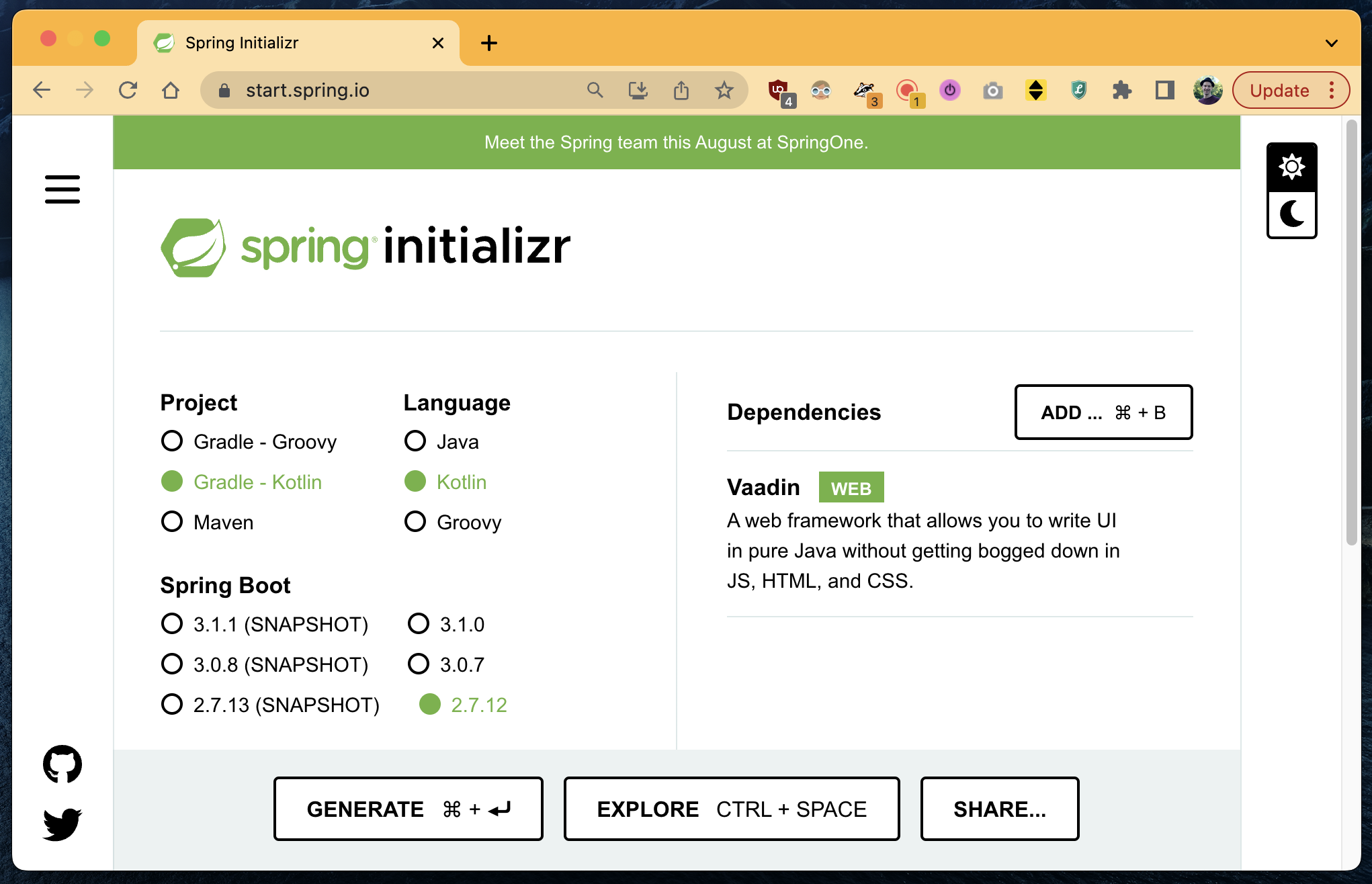
We can use the Spring Initializr at <a href="https://start.spring.io">https://start.spring.io</a> to setup the basic project skeleton.</p>

<p><img src="/images/2023/05/spring-init.png" alt="" /></p>

<p>After that, we can create a simple Vaadin view and we are almost done with the first step.</p>

<div class="language-kotlin highlighter-rouge"><div class="highlight"><pre class="highlight"><code><span class="nd">@Route</span><span class="p">(</span><span class="s">""</span><span class="p">)</span>
<span class="kd">class</span> <span class="nc">SimpleVaadinView</span> <span class="p">:</span> <span class="nc">VerticalLayout</span><span class="p">()</span> <span class="p">{</span>
    <span class="nf">init</span> <span class="p">{</span>
        <span class="k">this</span><span class="p">.</span><span class="nf">add</span><span class="p">(</span><span class="nc">Html</span><span class="p">(</span><span class="s">"&lt;h1&gt;Hello!&lt;/h1&gt;"</span><span class="p">))</span>
    <span class="p">}</span>
<span class="p">}</span>
</code></pre></div></div>

<p>However, there’s a small but important detail for the example we want to implement.
Our final goal is, to have multiple Vaadin apps running in the same browser tab via IFrames.
All of those apps will run under the same host (<code class="language-plaintext highlighter-rouge">localhost</code>).
So we must ensure two things:</p>

<ul>
  <li>⚠️ Every Vaadin app gets its own unique port</li>
  <li>⚠️ The <code class="language-plaintext highlighter-rouge">JSESSIONID</code> cookie must have a unique name</li>
</ul>

<p>We can achieve both by using the <code class="language-plaintext highlighter-rouge">application.properties</code>:</p>

<div class="language-properties highlighter-rouge"><div class="highlight"><pre class="highlight"><code><span class="py">server.port</span><span class="p">=</span><span class="s">8080</span>
<span class="py">server.servlet.session.cookie.name</span><span class="p">=</span><span class="s">JSESSIONID_MY_SIMPLE_VIEW</span>
</code></pre></div></div>

<p>Having a unique port is obvious as you cannot run multiple applications on the same port.
Renaming the <code class="language-plaintext highlighter-rouge">JSESSIONID</code> is necessary, because every app has its own session.
And since all apps will run in the same tab and under the same host, the cookie would be overwritten.
This would result in expired sessions, because only the last <code class="language-plaintext highlighter-rouge">JSESSIONID</code> would be stored in the cookie.
By renaming the cookie, we ensure that every app can handle its sessions correctly.</p>

<h2 id="integration-via-iframes">Integration via IFrames</h2>

<p>We want to integrate multiple independent UIs on a single page.
The example we want to implement looks like this:</p>

<div class="language-plaintext highlighter-rouge"><div class="highlight"><pre class="highlight"><code>   +=======================================================+
   |                    &lt;&lt; Browser Tab &gt;&gt;         x - *    |
   +=======================================================+
   |   Main-View                                           |
   |                                                       |
   |         &lt;&lt; IFrame &gt;&gt;             &lt;&lt; IFrame &gt;&gt;         |
   |   +---------------------+   +---------------------+   |
   |   | Left-View           |   | Right-View          |   |
   |   |                     |   |                     |   |
   |   |                     |   |                     |   |
   |   |                     |   |                     |   |  
   |   +---------------------+   +---------------------+   |
   |                                                       |
   +=======================================================+
</code></pre></div></div>

<p>We want to implement three independent apps:</p>

<ul>
  <li>A <strong>left-view</strong> which will run on port <code class="language-plaintext highlighter-rouge">8081</code></li>
  <li>A <strong>right-view</strong> which will run on port <code class="language-plaintext highlighter-rouge">8082</code></li>
  <li>And a <strong>main-view</strong> which will run on port <code class="language-plaintext highlighter-rouge">8080</code> and which will integrate the other views</li>
</ul>

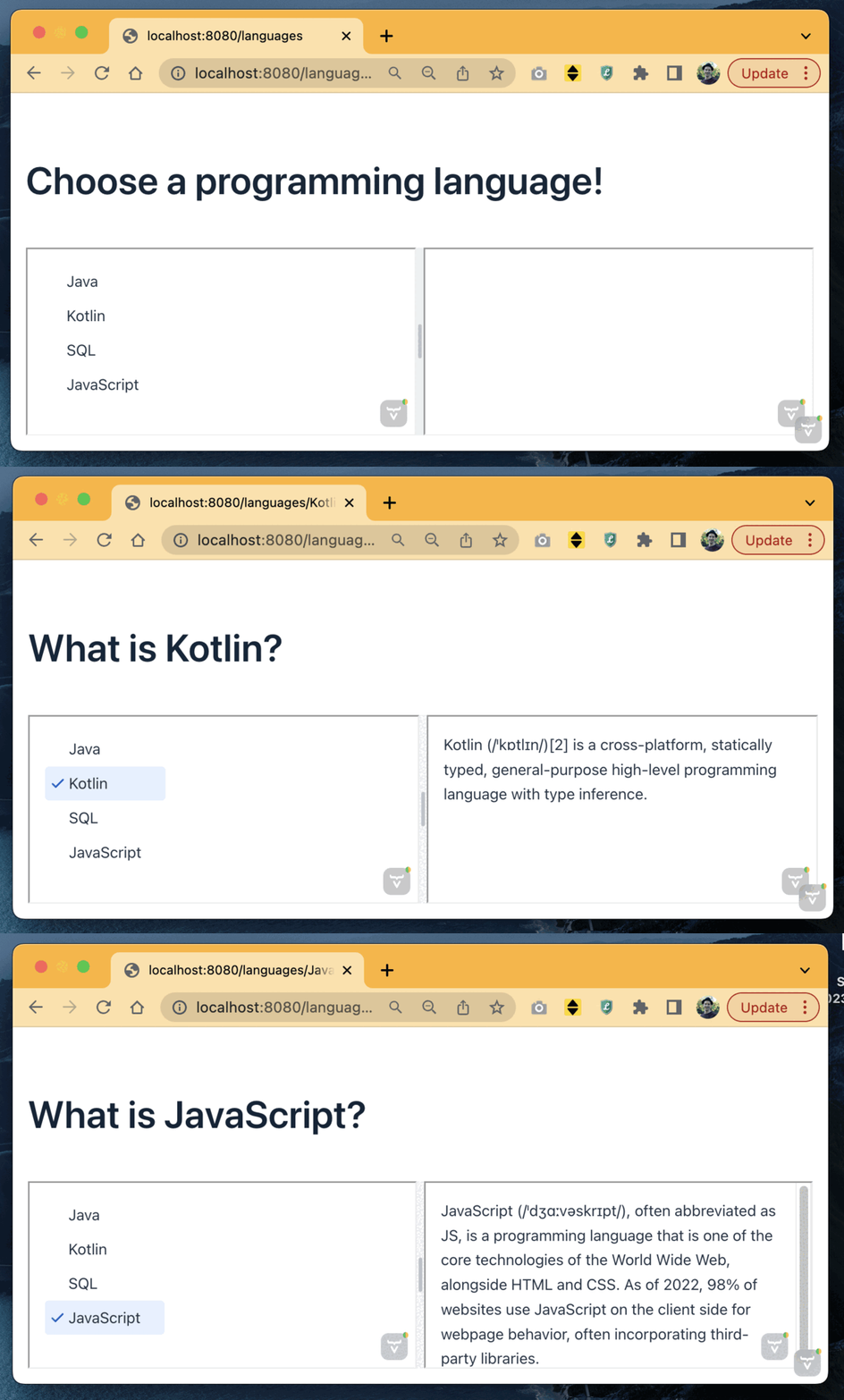
<p>For the example (which you can find on <a href="https://github.com/tuhrig/micro-ui-with-vaadin">GitHub</a>) we implement the following:</p>

<ul>
  <li>
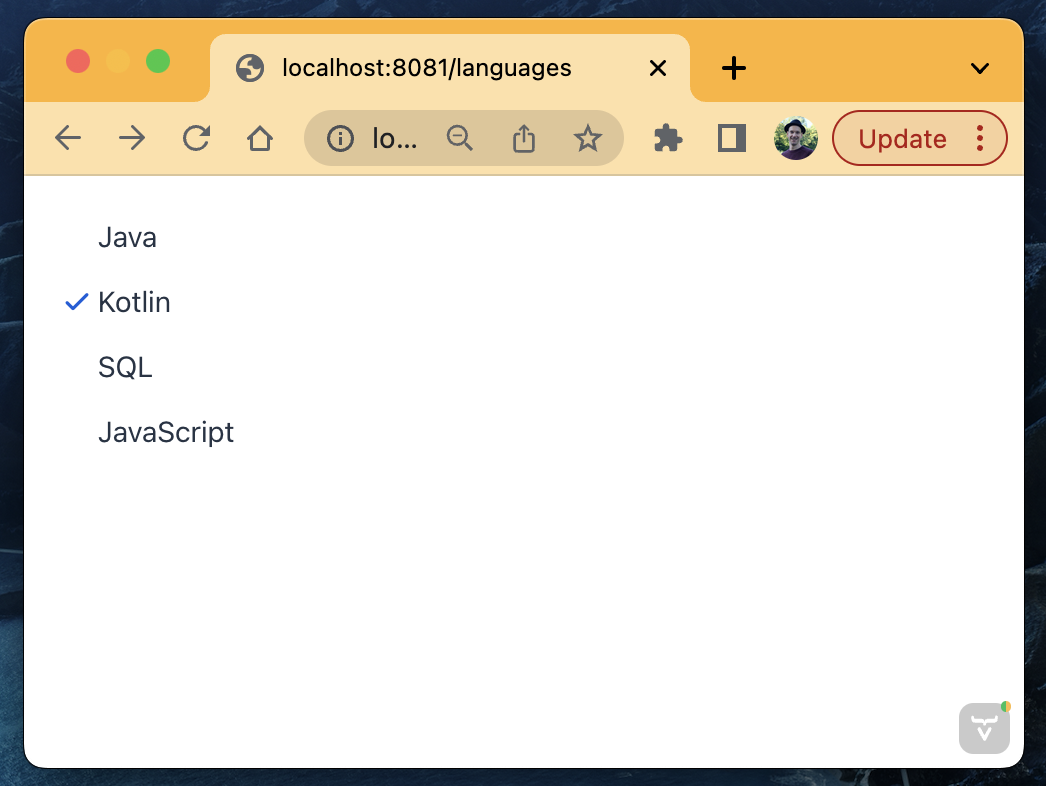
    <p>The <strong>left-view</strong> shows a list of programming languages.
The user can click on a language and select it.
<img src="/images/2023/05/left.png" width="400" /></p>
  </li>
  <li>
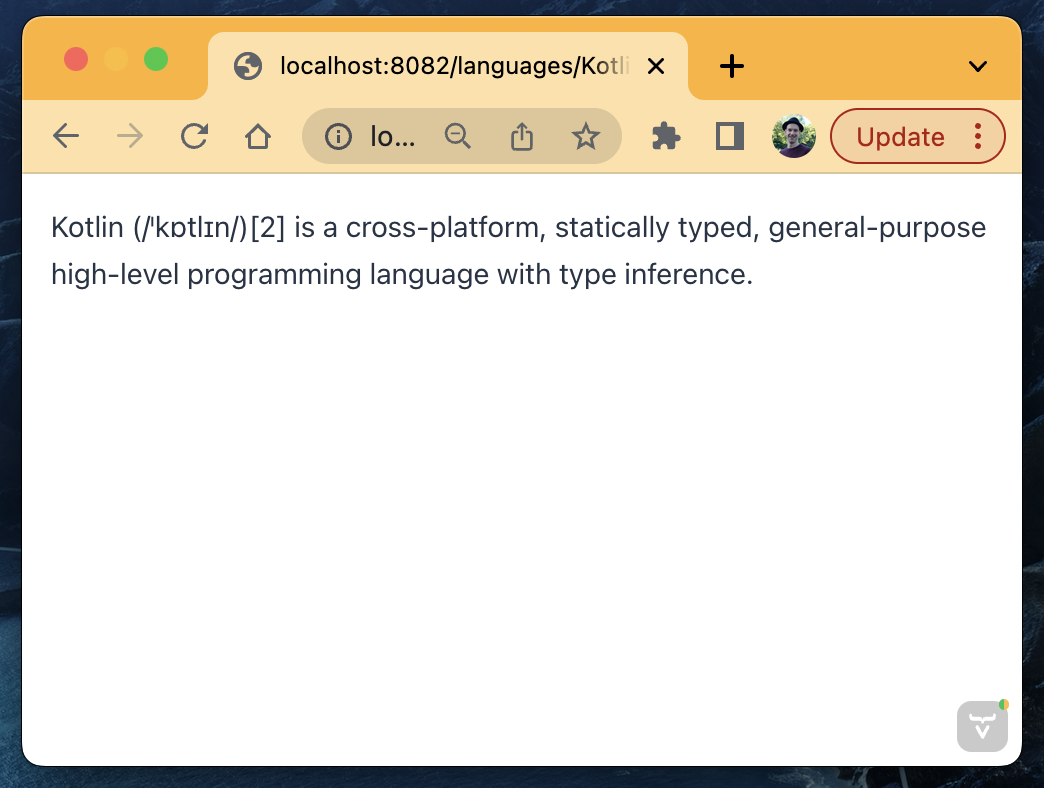
    <p>The <strong>right-view</strong> shows a short description of a programming language.
The user cannot click anything. 
The language can only be selected using a URL parameter (like <code class="language-plaintext highlighter-rouge">http://localhost:8082/languages/Kotlin</code>)
<img src="/images/2023/05/right.png" width="400" /></p>
  </li>
  <li>
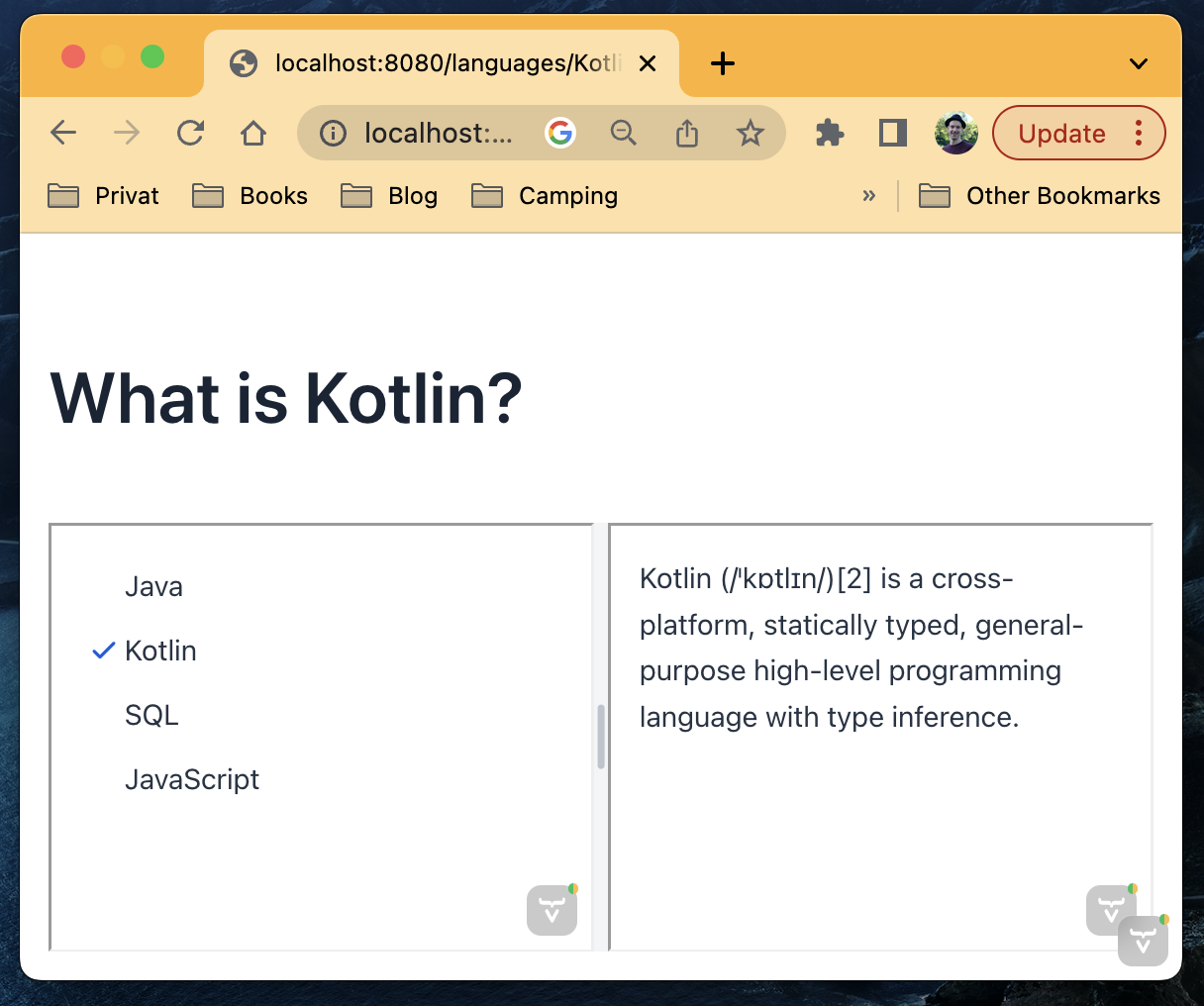
    <p>The <strong>main-view</strong> finally includes the other views via IFrames.
It also provides a nice heading on top of it.
<img src="/images/2023/05/main.png" width="400" /></p>
  </li>
</ul>

<p>Doing this is quite simple. 
The <strong>main-view</strong> looks like this:</p>

<div class="language-kotlin highlighter-rouge"><div class="highlight"><pre class="highlight"><code><span class="nd">@Route</span><span class="p">(</span><span class="s">"languages"</span><span class="p">)</span>
<span class="kd">class</span> <span class="nc">MainVaadinView</span> <span class="p">:</span> <span class="nc">VerticalLayout</span><span class="p">(),</span> <span class="nc">HasUrlParameter</span><span class="p">&lt;</span><span class="nc">String</span><span class="p">?&gt;</span> <span class="p">{</span>

    <span class="k">private</span> <span class="kd">val</span> <span class="py">heading</span> <span class="p">=</span> <span class="nc">Html</span><span class="p">(</span><span class="s">"&lt;h1&gt;Choose a programming language!&lt;/h1&gt;"</span><span class="p">)</span>
    <span class="k">private</span> <span class="kd">val</span> <span class="py">leftIFrame</span> <span class="p">=</span> <span class="nc">IFrame</span><span class="p">(</span><span class="s">"http://localhost:8081/languages"</span><span class="p">)</span>
    <span class="k">private</span> <span class="kd">val</span> <span class="py">rightIFrame</span> <span class="p">=</span> <span class="nc">IFrame</span><span class="p">(</span><span class="s">"http://localhost:8082/languages"</span><span class="p">)</span>

    <span class="nf">init</span> <span class="p">{</span>

        <span class="kd">val</span> <span class="py">splitLayout</span> <span class="p">=</span> <span class="nc">SplitLayout</span><span class="p">(</span><span class="n">leftIFrame</span><span class="p">,</span> <span class="n">rightIFrame</span><span class="p">)</span>
        <span class="n">splitLayout</span><span class="p">.</span><span class="nf">setSizeFull</span><span class="p">()</span>

        <span class="k">this</span><span class="p">.</span><span class="nf">add</span><span class="p">(</span><span class="n">heading</span><span class="p">)</span>
        <span class="k">this</span><span class="p">.</span><span class="nf">add</span><span class="p">(</span><span class="n">splitLayout</span><span class="p">)</span>
        <span class="k">this</span><span class="p">.</span><span class="nf">setSizeFull</span><span class="p">()</span>
    <span class="p">}</span>

    <span class="k">override</span> <span class="k">fun</span> <span class="nf">setParameter</span><span class="p">(</span><span class="n">event</span><span class="p">:</span> <span class="nc">BeforeEvent</span><span class="p">,</span> <span class="nd">@OptionalParameter</span> <span class="n">language</span><span class="p">:</span> <span class="nc">String</span><span class="p">?)</span> <span class="p">{</span>
        <span class="k">if</span> <span class="p">(!</span><span class="n">parameter</span><span class="p">.</span><span class="nf">isNullOrBlank</span><span class="p">())</span> <span class="p">{</span>
            <span class="n">heading</span><span class="p">.</span><span class="nf">setHtmlContent</span><span class="p">(</span><span class="s">"&lt;h1&gt;What is ${language}?&lt;/h1&gt;"</span><span class="p">)</span>
            <span class="n">leftIFrame</span><span class="p">.</span><span class="n">src</span> <span class="p">=</span> <span class="s">"http://localhost:8081/languages/$language"</span>
            <span class="n">rightIFrame</span><span class="p">.</span><span class="n">src</span> <span class="p">=</span> <span class="s">"http://localhost:8082/languages/$language"</span>
        <span class="p">}</span>
    <span class="p">}</span>
<span class="p">}</span>
</code></pre></div></div>

<p>What do we have right now?</p>

<ul>
  <li>The <strong>main-view</strong> integrates both other views via IFrames</li>
  <li>Depending on the URL parameter, a language is selected (e.g. <code class="language-plaintext highlighter-rouge">/languages/Java</code>)</li>
  <li>The language is passed on to the other views by setting the <code class="language-plaintext highlighter-rouge">src</code>  of the IFrame accordingly</li>
</ul>

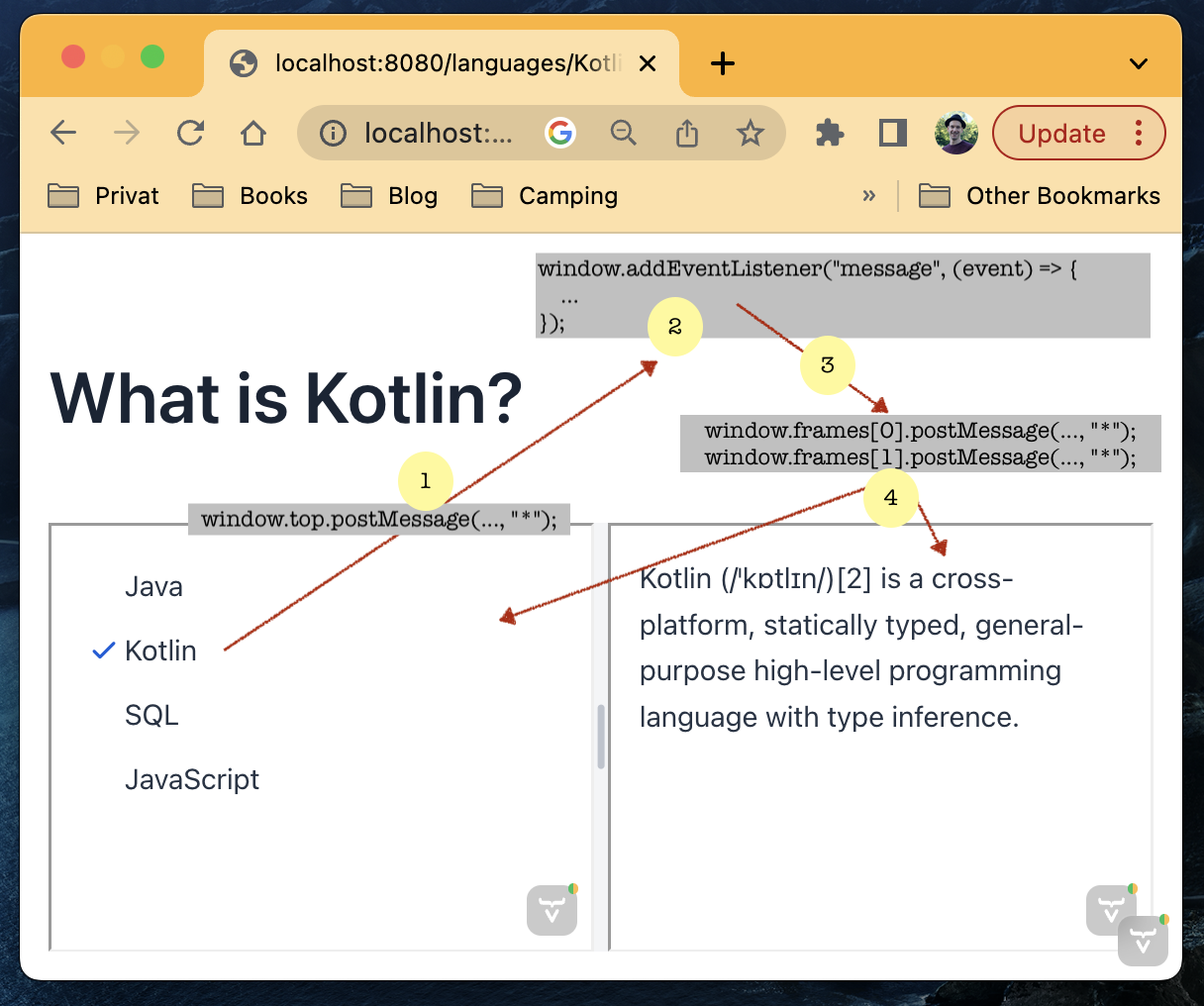
<p>However, the important part is still missing: the interaction.
A click on the <strong>left-view</strong> should change what the <strong>right-view</strong> is showing.
How can we achieve this?</p>

<h2 id="communication-between-iframes">Communication between IFrames</h2>

<p>Usually, IFrames are isolated and protected by the <a href="https://developer.mozilla.org/en-US/docs/Web/Security/Same-origin_policy">same-origin policy</a>.
Only code from the same origin (protocol + host + port) can interact.</p>

<p><strong>However, there’s an exception:</strong> 
We can use <code class="language-plaintext highlighter-rouge">window.postMessage()</code> (see <a href="https://developer.mozilla.org/en-US/docs/Web/API/Window/postMessage">here</a>) for cross-origin communication. 
If we obtain a reference to a <code class="language-plaintext highlighter-rouge">window</code> object, this API enables us to post a message to the <code class="language-plaintext highlighter-rouge">window</code>.
The <code class="language-plaintext highlighter-rouge">window</code> in return can listen to the event and react accordingly.</p>

<p>The basic idea goes like this:</p>

<div class="language-javascript highlighter-rouge"><div class="highlight"><pre class="highlight"><code><span class="c1">// The Main-View has a listener for messages</span>
<span class="nb">window</span><span class="p">.</span><span class="nx">addEventListener</span><span class="p">(</span><span class="dl">"</span><span class="s2">message</span><span class="dl">"</span><span class="p">,</span> <span class="p">(</span><span class="nx">event</span><span class="p">)</span> <span class="o">=&gt;</span> <span class="p">{</span>
  <span class="nx">console</span><span class="p">.</span><span class="nx">log</span><span class="p">(</span><span class="nx">event</span><span class="p">.</span><span class="nx">data</span><span class="p">)</span>
<span class="p">});</span>

<span class="c1">// The IFrame can post a message to its parent</span>
<span class="nb">window</span><span class="p">.</span><span class="nx">top</span><span class="p">.</span><span class="nx">postMessage</span><span class="p">(</span><span class="dl">"</span><span class="s2">Hello there!</span><span class="dl">"</span><span class="p">,</span> <span class="dl">"</span><span class="s2">*</span><span class="dl">"</span><span class="p">);</span>
</code></pre></div></div>

<p>Based on this simple approach, we can implement a communication pattern between the IFrames:</p>

<p><img src="/images/2023/05/communication.png" alt="" /></p>

<ol>
  <li>The user selects something in the left IFrame. 
By using <code class="language-plaintext highlighter-rouge">window.top.postMessage(...)</code> the IFrame can send an event to its parent (the <code class="language-plaintext highlighter-rouge">top</code> window).
Note that it is not possible to send a message directly to the other IFrame since there is no reference to this <code class="language-plaintext highlighter-rouge">window</code> object.</li>
  <li>The parent IFrame has a <code class="language-plaintext highlighter-rouge">window.addEventListener</code> to listen for the event. 
The event has some predefined format which is the protocol between the IFrames.
This can be anything, for example: <code class="language-plaintext highlighter-rouge">{"language":"Kotlin"}</code>.</li>
  <li>The parent IFrame broadcasts the event to all of its children. 
It is the only place where we can obtain a reference to all <code class="language-plaintext highlighter-rouge">window</code> objects.</li>
  <li>Every (child) IFrame can handle or ignore the event as it wants to.</li>
</ol>

<p><img src="/images/2023/05/flow.gif" alt="" /></p>

<p>As you can see, communication between IFrames only requires a bit of vanilla JavaScript.
But in case of Vaadin, we need an additional step, because all logic resides on the server-side. 
So we must transfer the JavaScript events back to the server in order to handle them.</p>

<p>To do so, we can use Vaadin’s <code class="language-plaintext highlighter-rouge">@ClientCallable</code> annotation (see <a href="https://vaadin.com/docs/latest/create-ui/element-api/client-server-rpc/#clientcallable-annotation">here</a>).
It lets us implement a listener method to send data from the JavaScript frontend to the Kotlin backend.</p>

<div class="language-kotlin highlighter-rouge"><div class="highlight"><pre class="highlight"><code><span class="nd">@ClientCallable</span>
<span class="k">fun</span> <span class="nf">receiveFrontendEvent</span><span class="p">(</span><span class="n">event</span><span class="p">:</span> <span class="nc">String</span><span class="p">)</span> <span class="p">{</span>
    <span class="n">log</span><span class="p">.</span><span class="nf">info</span><span class="p">(</span><span class="s">"Received event from frontend: {}"</span><span class="p">,</span> <span class="n">event</span><span class="p">)</span>
    <span class="o">..</span><span class="p">.</span>
<span class="p">}</span>
</code></pre></div></div>

<p>We can hook this method with some JavaScript to our <code class="language-plaintext highlighter-rouge">window.addEventListener</code>:</p>

<div class="language-kotlin highlighter-rouge"><div class="highlight"><pre class="highlight"><code><span class="n">element</span><span class="p">.</span><span class="nf">executeJs</span><span class="p">(</span><span class="s">"""
    window.addEventListener("message", (event) =&gt; {
        ${'$'}0.${'$'}server.receiveFrontendEvent(event.data);
    });
"""</span><span class="p">.</span><span class="nf">trimIndent</span><span class="p">(),</span> <span class="n">element</span><span class="p">)</span>
</code></pre></div></div>

<p>See the <a href="https://github.com/tuhrig/micro-ui-with-vaadin">example on GitHub</a> for the complete implementation.</p>

<h2 id="discussion">Discussion</h2>

<ul>
  <li><strong>Are IFrames bad?</strong> - IFrames are just another tool in the box.
They are simple, provide good isolation (especially in <a href="https://www.w3schools.com/tags/att_iframe_sandbox.asp">sandbox</a> mode) and are designed to embed content to a page.
The <code class="language-plaintext highlighter-rouge">window.postMessage(...)</code>-API makes communication save and easy. 
For simple micro-frontends with a decent amount of embedded elements, they are a good choice in my opinion.</li>
  <li><strong>Any alternatives?</strong> - You can find a discussion on different approaches at <a href="https://martinfowler.com/articles/micro-frontends.html">martinfowler.com</a>.
Besides <a href="https://martinfowler.com/articles/micro-frontends.html#Run-timeIntegrationViaIframes">IFrames</a>, the article lists server-side techniques and web-components.</li>
  <li><strong>Any specialties for Vaadin?</strong> - Vaadin provides a <code class="language-plaintext highlighter-rouge">WebComponentExporter</code> (see <a href="https://vaadin.com/docs/v14/flow/integrations/embedding/tutorial-webcomponent-exporter">here</a>) to export web-components.
You can find an example right <a href="https://vaadin.com/labs/micro-frontend">here</a>. 
A drawback for me is the need for a shared JavaScript bundle to use in the browser.</li>
</ul>

<h2 id="more">More</h2>

<ul>
  <li><a href="https://github.com/tuhrig/micro-ui-with-vaadin">https://github.com/tuhrig/micro-ui-with-vaadin</a></li>
  <li><a href="https://developer.mozilla.org/en-US/docs/Web/API/Window/postMessage">https://developer.mozilla.org/en-US/docs/Web/API/Window/postMessage</a></li>
  <li><a href="https://martinfowler.com/articles/micro-frontends.html">https://martinfowler.com/articles/micro-frontends.html</a></li>
</ul>

<p><strong>Best regards,</strong> Thomas.</p>]]></content><author><name>Thomas Uhrig</name></author><category term="coding" /><category term="java" /><category term="spring" /><category term="vaadin" /><summary type="html"><![CDATA[Microservices are a well established pattern in backend development. Everybody is using it. Running more than a dozen of microservices just to handle a single domain is not uncommon. But when it comes to frontend development, things are often different. I experienced two situations a lot:]]></summary></entry><entry><title type="html">How to plot test results to discover regressions</title><link href="http://tuhrig.de/plotting-test-results-to-see-regressions/" rel="alternate" type="text/html" title="How to plot test results to discover regressions" /><published>2023-03-06T00:00:00+00:00</published><updated>2023-03-06T00:00:00+00:00</updated><id>http://tuhrig.de/plotting-test-results-to-see-regressions</id><content type="html" xml:base="http://tuhrig.de/plotting-test-results-to-see-regressions/"><![CDATA[<p>In my daily work, I strongly believe in the benefits of End-2-End tests.
End-2-End tests give us the confidence that our system is working as in tended.
Other than unit tests, they are black box tests running from outside against our deployed services.
They are our final barrier before we deploy anything to production: if the End-2-End tests are green, we can hit the button.</p>

<p><img src="/images/2023/03/pipeline.png" alt="" /></p>

<h1 id="stability">Stability</h1>

<p>Often times End-2-End tests are not as stable as unit tests.
While the context of a unit test is very small and well-defined, End-2-End tests have many pitfalls.</p>

<ul>
  <li>Is every service deployed with the expected version?</li>
  <li>Are there any changes to the infrastructure?</li>
  <li>Is there a lot of traffic or network issues on the environment?</li>
  <li>Are there timing issues such as race-conditions in the tests?</li>
  <li>Do we have any regressions?</li>
  <li>Do we have some actual bugs?</li>
  <li>Have the acceptance tests been update to reflect all recent changed?</li>
</ul>

<p>To put it simply, a lot can go wrong.
And to be honest, our End-2-End tests will fail at least once a day. 
For sure.</p>

<h1 id="visualizing-the-rate-of-failed-tests">Visualizing the rate of failed tests</h1>

<p>If a single End-2-End tests fails, that’s not a big deal for us.
As I described above, there are a bunch of (good) reasons for this to happen.
However, the overall rate of failing tests might be an indicator for issues such as underlying bugs or technical debt.
But how can we visualize this failing rate?</p>

<h1 id="bitbucket-rest-api">Bitbucket REST-API</h1>

<p>First of all, we must have access to our build results. 
Let’s take <a href="https://bitbucket.org/">Bitbucket</a> as an example which offers a REST-API to do so.
The following <code class="language-plaintext highlighter-rouge">GET</code> request will query the first 100 build results from our pipeline.
It has five parameters which are important:</p>

<ul>
  <li><strong>(a)</strong> the name of the user / organisation / company</li>
  <li><strong>(b)</strong> the name of the repository</li>
  <li><strong>(c)</strong> the page to get (starting with 1)</li>
  <li><strong>(d)</strong> the page length (max 100)</li>
  <li><strong>(e)</strong> the trigger type</li>
</ul>

<div class="language-plaintext highlighter-rouge"><div class="highlight"><pre class="highlight"><code>https://api.bitbucket.org/2.0/repositories/my-user-name/acceptance-test/pipelines/?page=1&amp;pagelen=100&amp;sort=-created_on&amp;trigger_type=SCHEDULED
                                           |----------| |-------------|                 |         |-|                               |-------|
                                                a               b                       c          d                                    e
</code></pre></div></div>

<p>If you run the request, you will get a result like this.
It contains everything we need to visualize our build results over time.</p>

<div class="language-json highlighter-rouge"><div class="highlight"><pre class="highlight"><code><span class="p">{</span><span class="w">
   </span><span class="nl">"page"</span><span class="p">:</span><span class="mi">1</span><span class="p">,</span><span class="w">
   </span><span class="nl">"pagelen"</span><span class="p">:</span><span class="mi">2</span><span class="p">,</span><span class="w">
   </span><span class="nl">"values"</span><span class="p">:[</span><span class="w">
      </span><span class="p">{</span><span class="w">
         </span><span class="nl">"state"</span><span class="p">:{</span><span class="w">
            </span><span class="nl">"result"</span><span class="p">:{</span><span class="w">
               </span><span class="nl">"name"</span><span class="p">:</span><span class="s2">"SUCCESSFUL"</span><span class="w">
            </span><span class="p">}</span><span class="w">
         </span><span class="p">},</span><span class="w">
         </span><span class="nl">"build_number"</span><span class="p">:</span><span class="mi">33308</span><span class="p">,</span><span class="w">
         </span><span class="nl">"created_on"</span><span class="p">:</span><span class="s2">"2023-03-07T07:48:01.848598Z"</span><span class="p">,</span><span class="w">
         </span><span class="nl">"trigger"</span><span class="p">:{</span><span class="w">
            </span><span class="nl">"name"</span><span class="p">:</span><span class="s2">"SCHEDULE"</span><span class="p">,</span><span class="w">
            </span><span class="nl">"type"</span><span class="p">:</span><span class="s2">"pipeline_trigger_schedule"</span><span class="w">
         </span><span class="p">},</span><span class="w">
         </span><span class="nl">"duration_in_seconds"</span><span class="p">:</span><span class="mi">390</span><span class="w">
      </span><span class="p">},</span><span class="w">
      </span><span class="p">{</span><span class="w">
         </span><span class="nl">"state"</span><span class="p">:{</span><span class="w">
            </span><span class="nl">"result"</span><span class="p">:{</span><span class="w">
               </span><span class="nl">"name"</span><span class="p">:</span><span class="s2">"SUCCESSFUL"</span><span class="w">
            </span><span class="p">}</span><span class="w">
         </span><span class="p">},</span><span class="w">
         </span><span class="nl">"build_number"</span><span class="p">:</span><span class="mi">33307</span><span class="p">,</span><span class="w">
         </span><span class="nl">"created_on"</span><span class="p">:</span><span class="s2">"2023-03-07T06:48:00.912946Z"</span><span class="p">,</span><span class="w">
         </span><span class="nl">"trigger"</span><span class="p">:{</span><span class="w">
            </span><span class="nl">"name"</span><span class="p">:</span><span class="s2">"SCHEDULE"</span><span class="p">,</span><span class="w">
            </span><span class="nl">"type"</span><span class="p">:</span><span class="s2">"pipeline_trigger_schedule"</span><span class="w">
         </span><span class="p">},</span><span class="w">
         </span><span class="nl">"duration_in_seconds"</span><span class="p">:</span><span class="mi">379</span><span class="w">
      </span><span class="p">}</span><span class="w">
   </span><span class="p">]</span><span class="w">
</span><span class="p">}</span><span class="w">
</span></code></pre></div></div>

<h1 id="scripting-to-collect-all-build-results">Scripting to collect all build results</h1>

<p>We can query the build results page by page with a max page length of 100.
To get a huge number of build results, we can use some simple scripting.
In <a href="https://kotlinlang.org/">Kotlin</a> this could look like this:</p>

<div class="language-kotlin highlighter-rouge"><div class="highlight"><pre class="highlight"><code><span class="c1">// Authentication via Basic Auth header: user + app password</span>
<span class="kd">val</span> <span class="py">headers</span> <span class="p">=</span> <span class="nc">HttpHeaders</span><span class="p">().</span><span class="nf">apply</span> <span class="p">{</span>
    <span class="kd">val</span> <span class="py">base</span> <span class="p">=</span> <span class="nc">Base64</span><span class="p">.</span><span class="nf">encodeBase64</span><span class="p">(</span><span class="s">"$user:$appPassword"</span><span class="p">.</span><span class="nf">toByteArray</span><span class="p">())</span>
    <span class="kd">val</span> <span class="py">asString</span> <span class="p">=</span> <span class="nc">String</span><span class="p">(</span><span class="n">base</span><span class="p">)</span>
    <span class="k">set</span><span class="p">(</span><span class="s">"Authorization"</span><span class="p">,</span> <span class="s">"Basic $asString"</span><span class="p">)</span>
<span class="p">}</span>

<span class="c1">// Get page 1 to 3</span>
<span class="kd">val</span> <span class="py">pagesWithPipelineRuns</span><span class="p">:</span> <span class="nc">List</span><span class="p">&lt;</span><span class="nc">JsonNode</span><span class="p">&gt;</span> <span class="p">=</span> <span class="p">(</span><span class="mi">1</span><span class="o">..</span><span class="mi">3</span><span class="p">).</span><span class="nf">map</span> <span class="p">{</span> <span class="n">page</span> <span class="p">-&gt;</span>
    <span class="kd">val</span> <span class="py">uri</span> <span class="p">=</span> <span class="s">"https://api.bitbucket.org/2.0/repositories/$company/$repository/pipelines/?page=$page&amp;pagelen=100&amp;sort=-created_on&amp;trigger_type=SCHEDULED"</span>
    <span class="kd">val</span> <span class="py">result</span> <span class="p">=</span> <span class="n">restTemplate</span><span class="p">.</span><span class="nf">exchange</span><span class="p">(</span><span class="n">uri</span><span class="p">,</span> <span class="nc">GET</span><span class="p">,</span> <span class="nc">HttpEntity</span><span class="p">&lt;</span><span class="nc">String</span><span class="p">&gt;(</span><span class="n">headers</span><span class="p">),</span> <span class="nc">String</span><span class="o">::</span><span class="k">class</span><span class="p">.</span><span class="n">java</span><span class="p">)</span>
    <span class="n">objectMapper</span><span class="p">.</span><span class="nf">readTree</span><span class="p">(</span><span class="n">result</span><span class="p">.</span><span class="n">body</span><span class="p">).</span><span class="k">get</span><span class="p">(</span><span class="s">"values"</span><span class="p">)</span>
<span class="p">}</span>
</code></pre></div></div>

<h1 id="authentication-via-basic-auth">Authentication via Basic Auth</h1>

<p>The authentication works with basic auth. 
However, you must create an app password in order to do so.
Go to your <a href="https://bitbucket.org/account/settings/">personal settings</a> in Bitbucket, click on “<a href="https://bitbucket.org/account/settings/app-authorizations/">App passwords</a>” and create a new one.
You must use this password together with your username for Basic Auth.</p>

<p><img src="/images/2023/03/app-password.png" alt="" /></p>

<h1 id="create-a-csv-file">Create a CSV file</h1>

<p>At this point, we have a list of as many test results as we want.
We can query page after page for the last couple of years.
To plot the results we can map the JSON results to a simple CSV file.</p>

<p>First, we map the JSON from Bitbucket to a simple Kotlin data class.
This makes it much easier for us to create the CSV.</p>

<div class="language-kotlin highlighter-rouge"><div class="highlight"><pre class="highlight"><code><span class="kd">val</span> <span class="py">allPipelineResults</span> <span class="p">=</span> <span class="n">pagesWithPipelineRuns</span><span class="p">.</span><span class="nf">flatMap</span> <span class="p">{</span> <span class="n">it</span><span class="p">.</span><span class="nf">mapNotNull</span><span class="p">(</span><span class="o">::</span><span class="n">jsonToTestResult</span><span class="p">)</span> <span class="p">}</span>

<span class="k">fun</span> <span class="nf">jsonToTestResult</span><span class="p">(</span><span class="n">jsonOfTestResult</span><span class="p">:</span> <span class="nc">JsonNode</span><span class="p">):</span> <span class="nc">TestResults</span> <span class="p">{</span>
    <span class="kd">val</span> <span class="py">success</span> <span class="p">=</span> <span class="n">jsonOfTestResult</span><span class="p">.</span><span class="k">get</span><span class="p">(</span><span class="s">"state"</span><span class="p">).</span><span class="k">get</span><span class="p">(</span><span class="s">"result"</span><span class="p">).</span><span class="k">get</span><span class="p">(</span><span class="s">"name"</span><span class="p">).</span><span class="nf">asText</span><span class="p">()</span>
    <span class="k">return</span> <span class="nc">TestResults</span><span class="p">(</span>
        <span class="n">build</span> <span class="p">=</span> <span class="n">jsonOfTestResult</span><span class="p">.</span><span class="k">get</span><span class="p">(</span><span class="s">"build_number"</span><span class="p">).</span><span class="nf">asInt</span><span class="p">(),</span>
        <span class="n">success</span> <span class="p">=</span> <span class="k">if</span> <span class="p">(</span><span class="n">success</span> <span class="p">==</span> <span class="s">"SUCCESSFUL"</span><span class="p">)</span> <span class="mi">0</span> <span class="k">else</span> <span class="mi">1</span><span class="p">,</span>
        <span class="n">duration</span> <span class="p">=</span> <span class="n">jsonOfTestResult</span><span class="p">.</span><span class="k">get</span><span class="p">(</span><span class="s">"duration_in_seconds"</span><span class="p">).</span><span class="nf">asInt</span><span class="p">(),</span>
        <span class="n">createdOn</span> <span class="p">=</span> <span class="n">jsonOfTestResult</span><span class="p">.</span><span class="k">get</span><span class="p">(</span><span class="s">"created_on"</span><span class="p">).</span><span class="nf">asText</span><span class="p">().</span><span class="nf">asOffsetDateTime</span><span class="p">()</span>
    <span class="p">)</span>
<span class="p">}</span>

<span class="kd">data class</span> <span class="nc">TestResults</span><span class="p">(</span>
    <span class="kd">val</span> <span class="py">build</span><span class="p">:</span> <span class="nc">Int</span><span class="p">,</span>
    <span class="kd">val</span> <span class="py">success</span><span class="p">:</span> <span class="nc">Int</span><span class="p">,</span>
    <span class="kd">val</span> <span class="py">duration</span><span class="p">:</span> <span class="nc">Int</span><span class="p">,</span>
    <span class="kd">val</span> <span class="py">createdOn</span><span class="p">:</span> <span class="nc">OffsetDateTime</span>
<span class="p">)</span>
</code></pre></div></div>

<p>Now we can map all test results to a simple CSV file.
Since there might be many test results, I decided to group all results by day and to take the average.</p>

<div class="language-kotlin highlighter-rouge"><div class="highlight"><pre class="highlight"><code><span class="nc">File</span><span class="p">(</span><span class="s">"results.csv"</span><span class="p">).</span><span class="nf">printWriter</span><span class="p">().</span><span class="nf">use</span> <span class="p">{</span> <span class="k">out</span> <span class="p">-&gt;</span>
    <span class="n">allPipelineResults</span>
        <span class="p">.</span><span class="nf">distinct</span><span class="p">()</span>
        <span class="p">.</span><span class="nf">sortedBy</span> <span class="p">{</span> <span class="n">it</span><span class="p">.</span><span class="n">createdOn</span> <span class="p">}</span>
        <span class="p">.</span><span class="nf">groupBy</span> <span class="p">{</span> <span class="n">it</span><span class="p">.</span><span class="n">createdOn</span><span class="p">.</span><span class="nf">toLocalDate</span><span class="p">()</span> <span class="p">}</span> <span class="c1">// group by day</span>
        <span class="p">.</span><span class="nf">forEach</span> <span class="p">{</span>
            <span class="kd">val</span> <span class="py">success</span> <span class="p">=</span> <span class="n">it</span><span class="p">.</span><span class="n">value</span><span class="p">.</span><span class="nf">map</span> <span class="p">{</span> <span class="n">it</span><span class="p">.</span><span class="n">success</span> <span class="p">}.</span><span class="nf">average</span><span class="p">()</span> <span class="c1">// average per day</span>
            <span class="k">out</span><span class="p">.</span><span class="nf">println</span><span class="p">(</span><span class="s">"${it.key};${success};"</span><span class="p">)</span> <span class="c1">// e.g. 2023-03-06;0.452;</span>
        <span class="p">}</span>
<span class="p">}</span>
</code></pre></div></div>

<p>The final CSV file could look like this:</p>

<pre><code class="language-csv">2023-02-26;0.142;
2023-02-27;0.125;
2023-02-28;0.33;
2023-03-01;0.5;
2023-03-02;0.125;
2023-03-03;0.04166;
2023-03-04;0.0;
2023-03-05;0.0;
2023-03-06;0.0;
</code></pre>

<h1 id="plot-with-google-sheets">Plot with Google Sheets</h1>

<p>We can plot the CSV file easily with <a href="https://docs.google.com/spreadsheets">Google Sheets</a>.
Create a new spreadsheet an import the CSV file.</p>

<p><img src="/images/2023/03/import.png" alt="" /></p>

<p>Now you can mark both columns and insert a simple line chart.
The plotting should work without any modifications out of the box.
Just hit the button.</p>

<p><img src="/images/2023/03/insert-chart.png" alt="" /></p>

<h1 id="interpreting-the-chart">Interpreting the chart</h1>

<p>So what can we see with such a chart?
Let’s take a look at a real life example from our team.
The chart below shows the test results from one of our End-2-End tests for the last year.
Starting at January 2022 until March 2023 (aka today).</p>

<p><img src="/images/2023/03/chart.png" alt="" /></p>

<p>I’ve marked three sections in the chart which are interesting.</p>

<ul>
  <li><strong>(A)</strong> During this time we implemented a new search engine.
This was a big topic and took several weeks until everything was working.
You can see this very good in the chart.
The error rate goes up as soon as the new project was startet.
It drops only again weeks later when all issues have been fixed.</li>
  <li><strong>(B)</strong> At the beginning of section B we started a big organisational change.
We made new teams and changed our development process. 
This lead to an increase of technical dept for multiple weeks.</li>
  <li><strong>(C)</strong> In section C we started to tackle this problem.
We actively reduced technical debt and put our focus on bug-fixing.
The rate of failing End-2-End tests dropped as a consequence.</li>
</ul>

<p>As you can see, we can (try to) correlate the increase of the failure rate with some kind of events.
This helps us to spot problematic features or changes we did in the past.</p>

<h1 id="summary">Summary</h1>

<p>End-2-End tests are great and can give you much confidence in your system.
But of course, they will fail from time to time for whatever reason.
The rate of failure can be a good measurement for technical debt, underlying bugs or regressions.
By visualizing this failure rate (for example by plotting test results) you can correlate it with events.
Such events can be features or projects, but also other things such as organizational changes.</p>

<p><strong>Best regards,</strong> Thomas.</p>]]></content><author><name>Thomas Uhrig</name></author><category term="testing" /><summary type="html"><![CDATA[In my daily work, I strongly believe in the benefits of End-2-End tests. End-2-End tests give us the confidence that our system is working as in tended. Other than unit tests, they are black box tests running from outside against our deployed services. They are our final barrier before we deploy anything to production: if the End-2-End tests are green, we can hit the button.]]></summary></entry><entry><title type="html">Find all beans with annotation on method</title><link href="http://tuhrig.de/find-all-beans-with-annotation-on-method/" rel="alternate" type="text/html" title="Find all beans with annotation on method" /><published>2023-01-23T00:00:00+00:00</published><updated>2023-01-23T00:00:00+00:00</updated><id>http://tuhrig.de/find-all-beans-with-annotation-on-method</id><content type="html" xml:base="http://tuhrig.de/find-all-beans-with-annotation-on-method/"><![CDATA[<p>If you have ever worked with an event bus like <a href="https://kafka.apache.org/">Kafka</a>, <a href="https://aws.amazon.com/kinesis/">Kinesis</a> or <a href="https://activemq.apache.org/">ActiveMQ</a>, 
I’m sure you saw some code like below. 
A method annotated as some kind of event-listener.
Although every annotation is slightly different, the pattern is all the same.
But how are those methods picked-up by <a href="https://spring.io/">Spring</a>?</p>

<div class="language-java highlighter-rouge"><div class="highlight"><pre class="highlight"><code><span class="nd">@KafkaListener</span><span class="o">(</span><span class="n">topics</span> <span class="o">=</span> <span class="s">"orderSubmitted"</span><span class="o">)</span>
<span class="kd">public</span> <span class="kt">void</span> <span class="nf">handle</span><span class="o">(</span><span class="nc">String</span> <span class="n">event</span><span class="o">)</span> <span class="o">{</span>
    <span class="c1">// ...</span>
<span class="o">}</span>

<span class="nd">@KinesisListener</span><span class="o">(</span><span class="n">stream</span> <span class="o">=</span> <span class="s">"order-submitted-event"</span><span class="o">)</span>
<span class="kd">public</span> <span class="kt">void</span> <span class="nf">handle</span><span class="o">(</span><span class="nc">OrderSubmittedEvent</span> <span class="n">event</span><span class="o">)</span> <span class="o">{</span>
    <span class="c1">// ...</span>
<span class="o">}</span>

<span class="nd">@JmsListener</span><span class="o">(</span><span class="n">destination</span> <span class="o">=</span> <span class="s">"orderSubmitted"</span><span class="o">)</span>
<span class="kd">public</span> <span class="kt">void</span> <span class="nf">handle</span><span class="o">(</span><span class="nc">OrderSubmitted</span> <span class="n">event</span><span class="o">)</span> <span class="o">{</span>
    <span class="c1">// ...</span>
<span class="o">}</span>
</code></pre></div></div>

<h2 id="defining-a-custom-annotation">Defining a custom annotation</h2>

<p>For this example, we introduce a custom annotation. 
In <a href="https://kotlinlang.org/">Kotlin</a> this would look like this.
The annotation is called <code class="language-plaintext highlighter-rouge">@MyEventListener</code> and takes a single argument - the name of the event to listen for.</p>

<div class="language-kotlin highlighter-rouge"><div class="highlight"><pre class="highlight"><code><span class="nd">@Target</span><span class="p">(</span><span class="nc">AnnotationTarget</span><span class="p">.</span><span class="nc">FUNCTION</span><span class="p">)</span>
<span class="nd">@Retention</span><span class="p">(</span><span class="nc">AnnotationRetention</span><span class="p">.</span><span class="nc">RUNTIME</span><span class="p">)</span>
<span class="k">annotation</span> <span class="kd">class</span> <span class="nc">MyEventListener</span><span class="p">(</span><span class="kd">val</span> <span class="py">event</span><span class="p">:</span> <span class="nc">String</span><span class="p">)</span>
</code></pre></div></div>

<p>A complete event listener would look like this:</p>

<div class="language-kotlin highlighter-rouge"><div class="highlight"><pre class="highlight"><code><span class="nd">@Component</span>
<span class="kd">class</span> <span class="nc">EventListeners</span> <span class="p">{</span>
    
    <span class="nd">@MyEventListener</span><span class="p">(</span><span class="n">event</span> <span class="p">=</span> <span class="s">"order-submitted-event"</span><span class="p">)</span>
    <span class="k">fun</span> <span class="nf">handle</span><span class="p">(</span><span class="n">event</span><span class="p">:</span> <span class="nc">OrderSubmittedEvent</span><span class="p">)</span> <span class="p">{</span>
        <span class="c1">// ...</span>
    <span class="p">}</span>

    <span class="nd">@MyEventListener</span><span class="p">(</span><span class="n">event</span> <span class="p">=</span> <span class="s">"order-cancelled-event"</span><span class="p">)</span>
    <span class="k">fun</span> <span class="nf">handle</span><span class="p">(</span><span class="n">event</span><span class="p">:</span> <span class="nc">OrderCancelledEvent</span><span class="p">)</span> <span class="p">{</span>
        <span class="c1">// ...</span>
    <span class="p">}</span>
<span class="p">}</span>
</code></pre></div></div>

<p>So how can we pick up those methods?</p>

<h2 id="finding-all-beans">Finding all beans</h2>

<p>The first step is to get a list of all beans managed by Spring.
We can do this by using the <code class="language-plaintext highlighter-rouge">ApplicationContext</code> which gives us access to all available beans.
The only thing we must be careful with, is to wait until the <code class="language-plaintext highlighter-rouge">ApplicationContext</code> is ready to use.
In Kotlin, this would look like this:</p>

<div class="language-kotlin highlighter-rouge"><div class="highlight"><pre class="highlight"><code><span class="nd">@EventListener</span>
<span class="k">fun</span> <span class="nf">applicationReady</span><span class="p">(</span><span class="n">event</span><span class="p">:</span> <span class="nc">ApplicationReadyEvent</span><span class="p">)</span> <span class="p">{</span>
    <span class="kd">val</span> <span class="py">allAvailableBeans</span> <span class="p">=</span> <span class="nf">getAllBeans</span><span class="p">()</span>
    <span class="nf">println</span><span class="p">(</span><span class="n">allAvailableBeans</span><span class="p">)</span>
<span class="p">}</span>

<span class="k">private</span> <span class="k">fun</span> <span class="nf">getAllBeans</span><span class="p">():</span> <span class="nc">List</span><span class="p">&lt;</span><span class="nc">Any</span><span class="p">&gt;</span> <span class="p">{</span>
    <span class="k">return</span> <span class="n">applicationContext</span>
        <span class="p">.</span><span class="n">beanDefinitionNames</span>
        <span class="p">.</span><span class="nf">map</span> <span class="p">{</span> <span class="n">applicationContext</span><span class="p">.</span><span class="nf">getBean</span><span class="p">(</span><span class="n">it</span><span class="p">)</span> <span class="p">}</span>
<span class="p">}</span>
</code></pre></div></div>

<h2 id="finding-beans-with-annotated-methods">Finding beans with annotated methods</h2>

<p>After we have the list of all beans, we can search for methods with our annotation.</p>

<div class="language-kotlin highlighter-rouge"><div class="highlight"><pre class="highlight"><code><span class="kd">val</span> <span class="py">beansWithOurMethodAnnotation</span> <span class="p">=</span> <span class="n">allAvailableBeans</span><span class="p">.</span><span class="nf">filter</span> <span class="p">{</span>
    <span class="nc">AopUtils</span>
        <span class="p">.</span><span class="nf">getTargetClass</span><span class="p">(</span><span class="n">it</span><span class="p">)</span>
        <span class="p">.</span><span class="n">methods</span>
        <span class="p">.</span><span class="nf">any</span> <span class="p">{</span> <span class="n">it</span><span class="p">.</span><span class="nf">isAnnotationPresent</span><span class="p">(</span><span class="nc">MyEventListener</span><span class="o">::</span><span class="k">class</span><span class="p">.</span><span class="n">java</span><span class="p">)</span> <span class="p">}</span>
<span class="p">}</span>
</code></pre></div></div>

<p>This looks obvious except of one step: what is <code class="language-plaintext highlighter-rouge">AopUtils.getTargetClass(it)</code>?
To answer this question, we must take a closer look at how the Spring framework works.</p>

<p>Spring uses <a href="https://docs.spring.io/spring-framework/docs/current/reference/html/core.html#aop-introduction-proxies">proxies</a> to handle cross-cutting concerns such as transactions.
This means that a bean is not called directly, but by using a proxy.
The proxy wraps the actual bean and takes care of things such as transactions (before and after calling the actual class).</p>

<p><img src="/images/2023/01/aop-proxy-call.png" alt="" /></p>

<p>(Picture taken from <a href="https://docs.spring.io/spring-framework/docs/3.0.0.M3/reference/html/ch08s06.html">Spring Docs 3.0.0.M3</a>)</p>

<p>In your debugger this looks something like this:</p>

<p><img src="/images/2023/01/aop-debugger.png" alt="" /></p>

<p>The tricky thing is, that the proxy does not have a method annotated with our annotation.
Only the target class wrapped by the proxy has this annotation.
So we need to unwrap the class inside the proxy before looking for methods with our annotation.</p>

<h2 id="invoking-our-annotated-methods">Invoking our annotated methods</h2>

<p>Great, we found all beans which have a method annotated with our customer annotation!
But what can we do with them now? 
Of course, we can call them!</p>

<div class="language-kotlin highlighter-rouge"><div class="highlight"><pre class="highlight"><code><span class="kd">val</span> <span class="py">eventName</span> <span class="p">=</span> <span class="s">"order-submitted-event"</span>
<span class="kd">val</span> <span class="py">eventJson</span> <span class="p">=</span> <span class="s">"""{ "id":"o-2023-01", "customer":"c-21331", "items":[ ... ] }"""</span>

<span class="n">allAvailableBeans</span><span class="p">.</span><span class="nf">forEach</span> <span class="p">{</span> <span class="n">bean</span> <span class="p">-&gt;</span>
    <span class="nc">AopUtils</span>
        <span class="p">.</span><span class="nf">getTargetClass</span><span class="p">(</span><span class="n">bean</span><span class="p">)</span>
        <span class="p">.</span><span class="n">methods</span>
        <span class="p">.</span><span class="nf">filter</span> <span class="p">{</span> <span class="n">it</span><span class="p">.</span><span class="nf">isAnnotationPresent</span><span class="p">(</span><span class="nc">MyEventListener</span><span class="o">::</span><span class="k">class</span><span class="p">.</span><span class="n">java</span><span class="p">)</span> <span class="p">}</span>
        <span class="p">.</span><span class="nf">filter</span> <span class="p">{</span> <span class="n">it</span><span class="p">.</span><span class="nf">getAnnotation</span><span class="p">(</span><span class="nc">MyEventListener</span><span class="o">::</span><span class="k">class</span><span class="p">.</span><span class="n">java</span><span class="p">).</span><span class="n">event</span> <span class="p">==</span> <span class="n">eventName</span> <span class="p">}</span>
        <span class="p">.</span><span class="nf">forEach</span> <span class="p">{</span> <span class="n">method</span> <span class="p">-&gt;</span>
            <span class="kd">val</span> <span class="py">eventClass</span> <span class="p">=</span> <span class="n">method</span><span class="p">.</span><span class="n">parameterTypes</span><span class="p">[</span><span class="mi">0</span><span class="p">]</span>
            <span class="kd">val</span> <span class="py">event</span> <span class="p">=</span> <span class="n">objectMapper</span><span class="p">.</span><span class="nf">readValue</span><span class="p">(</span><span class="n">eventJson</span><span class="p">,</span> <span class="n">eventClass</span><span class="p">)</span>
            <span class="n">method</span><span class="p">.</span><span class="nf">invoke</span><span class="p">(</span><span class="n">bean</span><span class="p">,</span> <span class="n">event</span><span class="p">)</span>
        <span class="p">}</span>
<span class="p">}</span>
</code></pre></div></div>

<h2 id="an-example-use-case">An example use-case</h2>

<p>An example would be to use this technique to provide REST-controllers for event listeners (such as <a href="https://aws.amazon.com/kinesis/">Kinesis</a>, <a href="https://kafka.apache.org/">Kafka</a> or <a href="https://activemq.apache.org/">ActiveMQ</a>).
The event listeners are called by any incoming record from Kinesis. 
But sometimes it’s good to have a simple way for providing test data and debugging.
So we implemented a generic REST-controller to invoke any Kinesis event listeners.
It looks like this.
The REST-controller makes it super easy to send some JSON to a Kinesis event listener.
It’s very convenient.</p>

<div class="language-kotlin highlighter-rouge"><div class="highlight"><pre class="highlight"><code><span class="nd">@RestController</span>
<span class="kd">class</span> <span class="nc">KinesisListenerController</span><span class="p">(</span><span class="k">private</span> <span class="kd">val</span> <span class="py">objectMapper</span><span class="p">:</span> <span class="nc">ObjectMapper</span><span class="p">)</span> <span class="p">{</span>

    <span class="k">private</span> <span class="kd">var</span> <span class="py">listeners</span><span class="p">:</span> <span class="nc">List</span><span class="p">&lt;</span><span class="nc">Any</span><span class="p">&gt;</span> <span class="p">=</span> <span class="nf">emptyList</span><span class="p">()</span>
    
    <span class="nd">@PutMapping</span><span class="p">(</span><span class="s">"/kinesis/streams/{stream}"</span><span class="p">)</span>
    <span class="k">fun</span> <span class="nf">event</span><span class="p">(</span><span class="nd">@PathVariable</span> <span class="n">stream</span><span class="p">:</span> <span class="nc">String</span><span class="p">,</span> <span class="nd">@RequestBody</span> <span class="n">json</span><span class="p">:</span> <span class="nc">String</span><span class="p">)</span> <span class="p">{</span>
        <span class="n">listeners</span>
            <span class="p">.</span><span class="nf">forEach</span> <span class="p">{</span> <span class="n">bean</span> <span class="p">-&gt;</span>
                <span class="nc">AopUtils</span>
                    <span class="p">.</span><span class="nf">getTargetClass</span><span class="p">(</span><span class="n">bean</span><span class="p">)</span>
                    <span class="p">.</span><span class="n">methods</span>
                    <span class="p">.</span><span class="nf">filter</span> <span class="p">{</span> <span class="n">it</span><span class="p">.</span><span class="nf">isAnnotationPresent</span><span class="p">(</span><span class="nc">KinesisListener</span><span class="o">::</span><span class="k">class</span><span class="p">.</span><span class="n">java</span><span class="p">)</span> <span class="p">}</span>
                    <span class="p">.</span><span class="nf">filter</span> <span class="p">{</span> <span class="n">it</span><span class="p">.</span><span class="nf">getAnnotation</span><span class="p">(</span><span class="nc">KinesisListener</span><span class="o">::</span><span class="k">class</span><span class="p">.</span><span class="n">java</span><span class="p">).</span><span class="n">stream</span> <span class="p">==</span> <span class="n">stream</span> <span class="p">}</span>
                    <span class="p">.</span><span class="nf">forEach</span> <span class="p">{</span> <span class="n">method</span> <span class="p">-&gt;</span>
                        <span class="kd">val</span> <span class="py">eventClass</span> <span class="p">=</span> <span class="n">method</span><span class="p">.</span><span class="n">parameterTypes</span><span class="p">[</span><span class="mi">0</span><span class="p">]</span>
                        <span class="kd">val</span> <span class="py">event</span> <span class="p">=</span> <span class="n">objectMapper</span><span class="p">.</span><span class="nf">readValue</span><span class="p">(</span><span class="n">json</span><span class="p">,</span> <span class="n">eventClass</span><span class="p">)</span>
                        <span class="n">method</span><span class="p">.</span><span class="nf">invoke</span><span class="p">(</span><span class="n">bean</span><span class="p">,</span> <span class="n">event</span><span class="p">)</span>
                    <span class="p">}</span>
            <span class="p">}</span>
    <span class="p">}</span>

    <span class="nd">@EventListener</span>
    <span class="k">fun</span> <span class="nf">applicationReady</span><span class="p">(</span><span class="n">event</span><span class="p">:</span> <span class="nc">ApplicationReadyEvent</span><span class="p">)</span> <span class="p">{</span>
        <span class="n">listeners</span> <span class="p">=</span> <span class="nf">getAllBeans</span><span class="p">()</span>
            <span class="p">.</span><span class="nf">filter</span> <span class="p">{</span>
                <span class="nc">AopUtils</span>
                    <span class="p">.</span><span class="nf">getTargetClass</span><span class="p">(</span><span class="n">it</span><span class="p">)</span>
                    <span class="p">.</span><span class="n">methods</span>
                    <span class="p">.</span><span class="nf">any</span> <span class="p">{</span> <span class="n">it</span><span class="p">.</span><span class="nf">isAnnotationPresent</span><span class="p">(</span><span class="nc">KinesisListener</span><span class="o">::</span><span class="k">class</span><span class="p">.</span><span class="n">java</span><span class="p">)</span> <span class="p">}</span>
            <span class="p">}</span>
    <span class="p">}</span>

    <span class="k">private</span> <span class="k">fun</span> <span class="nf">getAllBeans</span><span class="p">():</span> <span class="nc">List</span><span class="p">&lt;</span><span class="nc">Any</span><span class="p">&gt;</span> <span class="p">{</span>
        <span class="k">return</span> <span class="n">applicationContext</span>
            <span class="p">.</span><span class="n">beanDefinitionNames</span>
            <span class="p">.</span><span class="nf">map</span> <span class="p">{</span> <span class="n">applicationContext</span><span class="p">.</span><span class="nf">getBean</span><span class="p">(</span><span class="n">it</span><span class="p">)</span> <span class="p">}</span>
    <span class="p">}</span>
<span class="p">}</span>

</code></pre></div></div>

<h2 id="more">More</h2>

<ul>
  <li><a href="https://www.baeldung.com/spring-context-events">Spring Application Context Events</a></li>
  <li><a href="https://docs.spring.io/spring-framework/docs/current/reference/html/core.html#aop-introduction-proxies">Spring AOP Proxies</a></li>
</ul>

<p><strong>Best regards,</strong> Thomas.</p>]]></content><author><name>Thomas Uhrig</name></author><category term="coding" /><category term="java" /><category term="spring" /><summary type="html"><![CDATA[If you have ever worked with an event bus like Kafka, Kinesis or ActiveMQ, I’m sure you saw some code like below. A method annotated as some kind of event-listener. Although every annotation is slightly different, the pattern is all the same. But how are those methods picked-up by Spring?]]></summary></entry><entry><title type="html">Neo4J with Spring Boot</title><link href="http://tuhrig.de/neo4j-with-spring-boot/" rel="alternate" type="text/html" title="Neo4J with Spring Boot" /><published>2023-01-16T00:00:00+00:00</published><updated>2023-01-16T00:00:00+00:00</updated><id>http://tuhrig.de/neo4j-with-spring-boot</id><content type="html" xml:base="http://tuhrig.de/neo4j-with-spring-boot/"><![CDATA[<p>Over the last ten years, I worked with a lot of different database.
I worked with traditional SQL databases such as <a href="https://www.ibm.com/products/db2">DB2</a> and <a href="https://www.oracle.com/database/">Oracle</a> in a professional context.
NoSQL databases such as <a href="https://aws.amazon.com/dynamodb/">DynamoDB</a> have been my best friends during the last five years. 
On side projects I also touched stuff like <a href="https://www.mongodb.com/">MongoDB</a>. 
However, I never worked with a graph-database up till now. 
Time to change that with <a href="https://neo4j.com/">Neo4J</a>!</p>

<h2 id="graph-databases">Graph Databases</h2>

<p>Graph databases store information - as the name implies - as a graph.
They create a network between different nodes by defining relations.
This makes it easy to see how entities stand to each other.
Every relation has a semantic.
In a traditional SQL database, this would be implemented by <code class="language-plaintext highlighter-rouge">JOIN</code> operations which is usually complex and slow.</p>

<p>Note that there are two types of graph databases:</p>

<ul>
  <li>RDF based graph databases which store everything as simple triplets</li>
  <li>Property Graphs (like Neo4J) which store information as nodes and edges with properties</li>
</ul>

<p>(More <a href="https://www.wisecube.ai/blog/knowledge-graphs-rdf-or-property-graphs-which-one-should-you-pick/">here</a>)</p>

<h2 id="example">Example</h2>

<p>Let’s make an example. 
Below you can see a dependency graph from the <a href="https://github.com/tuhrig/neo4j-demo">demo project</a> I posted on GitHub.</p>

<ul>
  <li>There are three shops (EDEKA, ATU and Media Markt)</li>
  <li>Each shop has a couple of locations</li>
  <li>Shops might have the same location (maybe they are in the same shopping-center)</li>
  <li>There are products which are sold by shops</li>
  <li>Products are compatible with each other or respectively require another product</li>
</ul>

<p><img src="/images/2023/01/neo4j-graph.png" alt="" /></p>

<p>If we try to break down the data model, we will have the following:</p>

<ul>
  <li>3 entities (<code class="language-plaintext highlighter-rouge">shop</code>, <code class="language-plaintext highlighter-rouge">location</code> and <code class="language-plaintext highlighter-rouge">product</code>)</li>
  <li>4 relations (<code class="language-plaintext highlighter-rouge">located_at</code>, <code class="language-plaintext highlighter-rouge">sold_by</code>, <code class="language-plaintext highlighter-rouge">compatible_with</code>, <code class="language-plaintext highlighter-rouge">requires</code>)</li>
</ul>

<p>In a relational SQL database this would look like this:</p>

<p><img src="/images/2023/01/neo4j-as-sql.png" alt="" /></p>

<ul>
  <li>3 tables for the entities (<code class="language-plaintext highlighter-rouge">shop</code>, <code class="language-plaintext highlighter-rouge">location</code> and <code class="language-plaintext highlighter-rouge">product</code>)</li>
  <li>4 tables for the relations (<em>many-to-many</em> relationship)</li>
</ul>

<p>The main difference between graph databases and relational databases is the following:</p>

<ul>
  <li>Building relations in SQL is hard, but easy in Graph databases.
Relations in SQL means to use <code class="language-plaintext highlighter-rouge">JOIN</code> operations which are complex and not efficient.</li>
  <li>SQL databases focus on single tables with a strong schema and transaction handling.
So while relation databases are super efficient with single entries, graph databases are efficient with relations.</li>
</ul>

<p>So how does a <code class="language-plaintext highlighter-rouge">JOIN</code> operation look like in Neo4J?</p>

<div class="language-plaintext highlighter-rouge"><div class="highlight"><pre class="highlight"><code>MATCH (p:product)-[r:SOLD_BY]-&gt;(s:shop)
WHERE EXISTS {
    MATCH (s)-[:LOCATED_AT]-&gt;(:location {city: 'Karlsruhe'})
}
RETURN p.name, s.name
</code></pre></div></div>

<p>This query selects all products which are sold in “Karlsruhe” (including the shop name).
The result looks like this:</p>

<div class="language-plaintext highlighter-rouge"><div class="highlight"><pre class="highlight"><code>| p.name              | s.name
+---------------------+----------
| "USB Cabel"         | "ATU"
| "Cleaning Spray"    | "ATU"
</code></pre></div></div>

<h2 id="neo4j-with-spring-boot">Neo4J with Spring Boot</h2>

<p>I prepared a simple demo project which shows how to use <a href="https://neo4j.com/">Neo4J</a> with Spring Boot.
You can find the <a href="https://github.com/tuhrig/neo4j-demo">project on GitHub</a>.
It shows a simple example with some entities (see example above), REST-controllers and boilerplate-code.</p>

<ul>
  <li>Define entities and relations</li>
  <li>Create data</li>
  <li>Query nodes and relations</li>
</ul>

<blockquote>
  <p><a href="https://github.com/tuhrig/neo4j-demo">https://github.com/tuhrig/neo4j-demo</a></p>
</blockquote>

<h2 id="more">More</h2>

<ul>
  <li><a href="https://memgraph.com/blog/graph-database-vs-relational-database">https://memgraph.com/blog/graph-database-vs-relational-database</a></li>
  <li><a href="https://neo4j.com/developer/spring-data-neo4j/">https://neo4j.com/developer/spring-data-neo4j</a></li>
  <li><a href="https://www.baeldung.com/spring-data-neo4j-intro">https://www.baeldung.com/spring-data-neo4j-intro </a></li>
  <li><a href="https://www.wisecube.ai/blog/knowledge-graphs-rdf-or-property-graphs-which-one-should-you-pick/">https://www.wisecube.ai/blog/knowledge-graphs-rdf-or-property-graphs-which-one-should-you-pick</a></li>
</ul>

<p><strong>Best regards,</strong> Thomas.</p>]]></content><author><name>Thomas Uhrig</name></author><category term="coding" /><category term="java" /><category term="spring" /><category term="database" /><summary type="html"><![CDATA[Over the last ten years, I worked with a lot of different database. I worked with traditional SQL databases such as DB2 and Oracle in a professional context. NoSQL databases such as DynamoDB have been my best friends during the last five years. On side projects I also touched stuff like MongoDB. However, I never worked with a graph-database up till now. Time to change that with Neo4J!]]></summary></entry><entry><title type="html">Monitoring latency in a Microservice Architecture</title><link href="http://tuhrig.de/monitoring-latency-in-a-microservice-architecture/" rel="alternate" type="text/html" title="Monitoring latency in a Microservice Architecture" /><published>2023-01-10T00:00:00+00:00</published><updated>2023-01-10T00:00:00+00:00</updated><id>http://tuhrig.de/monitoring-latency-in-a-microservice-architecture</id><content type="html" xml:base="http://tuhrig.de/monitoring-latency-in-a-microservice-architecture/"><![CDATA[<p>Last year, I mentored our working student <a href="https://www.xing.com/profile/Steffen_Scheller7">Steffen Scheller</a> along his way to his <a href="/assets/pdf/Bachelor-Thesis_Steffen-Scheller.pdf">Bachelor thesis</a>.
Steffen was part of <a href="https://www.bringmeister.de/">Bringmeister</a> for about a year when he decided to write his final academic paper with us.
Together, we came up with an interesting topic:</p>

<blockquote>
  <p>Monitoring latency in a Microservice Architecture</p>
</blockquote>

<h2 id="background">Background</h2>

<p>At Bringmeister, all software we developed during the last five years is composed of <a href="https://aws.amazon.com/microservices/">microservices</a>.
Information drops into the system at one point, moves from service to service and eventually reaches its goal.</p>

<p>A typical dataflow would look like this:</p>

<div class="language-plaintext highlighter-rouge"><div class="highlight"><pre class="highlight"><code> ------------------------- direction of data flow -----------------------&gt;

 +-----+
 | ERP | -- Master Data ----v
 +-----+            +-------------+        +--------------+    
                    | Aggregation | -----&gt; | Search Index | 
                    |   Service   |        |    Service   | 
                    +-------------+        +--------------+ 
 +-----+                     ^                    |
 | PIM | -- Product Data ----+                    v
 +-----+                                   +-------------+     +----------+
                                           | SaaS Search | --&gt; | Web Shop |
                                           |    Index    |     +----------+  
                                           +-------------+
</code></pre></div></div>

<p>An architecture like this brings up a couple of questions:</p>

<ul>
  <li>How long does it take for data from end to end? For example from our <code class="language-plaintext highlighter-rouge">ERP</code> to the search index?</li>
  <li>Which service takes the most time?</li>
  <li>How does a change to the system affect the time?</li>
</ul>

<p>Steffen’s Bachelor thesis tries to give an answer to those questions.</p>

<h2 id="measuring-latency">Measuring latency</h2>

<p>Steffen implemented a microservice (called <em><a href="https://en.wikipedia.org/wiki/Chronos">Chronos</a></em>) to measure the time between two points in the system (<em>ERP</em> and <em>search index</em>).
The service receives all incoming data simultaneously to the regular system.
Based on a sampling algorithm it decides which request should be taken for measurement:</p>

<ul>
  <li>A fixed list of IDs</li>
  <li>Every tenth or hundredth request</li>
  <li>A certain quota (for example 100 per 5 minutes)</li>
  <li>…</li>
</ul>

<p>The service then measures the time until the data arrives in the search index.
It does so by actively polling the search index until it returnes the expected data.</p>

<p>This approach gave us a couple of advantages:</p>

<ul>
  <li>We did not relay on logs.
Logs can be late (latency until they arrive in the logging system) or misleading (e.g. written before or way after an operation).</li>
  <li>We did not relay on events from the monitored systems themselves.
For example an event that states that the data was written to the search index, does not mean that the data is already indexed and live, too.</li>
  <li>We had the opportunity to do a lot of customizing. 
For example, we implemented a CSV download of the results but also a <a href="https://micrometer.io/">Micrometer</a>-based metric for <a href="https://www.datadoghq.com/">DataDog</a>.</li>
  <li>We could easily change the measuring or parts of the system taken into account. 
For example, we compared two different search engines in parallel under production load.</li>
</ul>

<h2 id="the-results">The results</h2>

<p>Steffen’s work brought up a lot of interesting results for us.</p>

<ul>
  <li>The latency from end to end is between 10 and 15 seconds most of the time.
So an update from ERP is live in the shop in about 15 seconds.</li>
  <li>The latency does depend on the load, but not as much as we thought.
Random peaks and outliers are actually bigger as the correlation to the load.</li>
  <li>Single systems have a huge impact. 
The search index for example is responsible for most of the time needed to get an update live.
So switching the search engine (SaaS) has a huge impact.</li>
</ul>

<p><img src="/images/2023/01/microservice-latency.png" alt="" /></p>

<h2 id="thank-you">Thank you</h2>

<h4 id="i-would-like-to-thank-steffen-for-his-great-thesis-and-work">I would like to thank Steffen for his great thesis and work.</h4>
<h4 id="congratulations-on-your-bachelor-degree">Congratulations on your Bachelor degree!</h4>
<h4>🏆🎉🍀</h4>

<h2 id="download">Download</h2>

<p>You can download Steffen’s Bachelor thesis right <a href="/assets/pdf/Bachelor-Thesis_Steffen-Scheller.pdf">here</a>.
It’s written in German.</p>

<p><strong>Best regards,</strong> Thomas.</p>]]></content><author><name>Thomas Uhrig</name></author><category term="academic" /><category term="job" /><category term="java" /><category term="spring" /><summary type="html"><![CDATA[Last year, I mentored our working student Steffen Scheller along his way to his Bachelor thesis. Steffen was part of Bringmeister for about a year when he decided to write his final academic paper with us. Together, we came up with an interesting topic:]]></summary></entry><entry><title type="html">Mocking repos with Dynamic Proxies</title><link href="http://tuhrig.de/mocking-repos-with-dynamic-proxies/" rel="alternate" type="text/html" title="Mocking repos with Dynamic Proxies" /><published>2023-01-06T00:00:00+00:00</published><updated>2023-01-06T00:00:00+00:00</updated><id>http://tuhrig.de/mocking-repos-with-dynamic-proxies</id><content type="html" xml:base="http://tuhrig.de/mocking-repos-with-dynamic-proxies/"><![CDATA[<p>Recently I stumbled across an interesting GitHub repository.
It shows a way to mock <a href="https://www.baeldung.com/the-persistence-layer-with-spring-data-jpa">Spring Data</a> repositories for testing.
The clue is, that the “mocks” are actual in-memory implementations based on Dynamic Proxies.
No <a href="https://www.docker.com/">Docker</a>, no <a href="https://www.h2database.com">H2</a>, no <a href="https://site.mockito.org/">Mockito</a>.</p>

<blockquote>
  <p><a href="https://github.com/mmnaseri/spring-data-mock">https://github.com/mmnaseri/spring-data-mock</a></p>
</blockquote>

<h2 id="spring-data">Spring Data</h2>

<p>Spring Data works by implementing repository interface during runtime. 
Here’s an example. 
Let’s say you have a <code class="language-plaintext highlighter-rouge">User</code> object which should be saved.
You could write the following repository interface:</p>

<div class="language-java highlighter-rouge"><div class="highlight"><pre class="highlight"><code><span class="kd">public</span> <span class="kd">interface</span> <span class="nc">UserRepository</span> <span class="kd">extends</span> <span class="nc">JpaRepository</span><span class="o">&lt;</span><span class="nc">User</span><span class="o">,</span> <span class="nc">Long</span><span class="o">&gt;</span> <span class="o">{</span>
    <span class="nc">User</span> <span class="nf">findByName</span><span class="o">(</span><span class="nc">String</span> <span class="n">name</span><span class="o">);</span>
<span class="o">}</span>
</code></pre></div></div>

<p>During runtime, Spring Data would provide an implementation based on this interface.
Every method of the interface follows a certain convention, so Spring Data knows how to implement it.</p>

<h2 id="dynamic-proxies">Dynamic Proxies</h2>

<p>Technically, this is solved by using <a href="https://www.baeldung.com/java-dynamic-proxies">Dynamic Proxies</a>.
Dynamic Proxies let us create a proxy for an interface during runtime.
The proxy will receive every method invocation on the interface and can handle it.
Spring uses it a lot, not only for repositories, but for all kinds of cross-cutting concerns such as transactions or caches.</p>

<p>In <a href="https://kotlinlang.org/">Kotlin</a>, this could look like this:</p>

<div class="language-kotlin highlighter-rouge"><div class="highlight"><pre class="highlight"><code><span class="kd">val</span> <span class="py">proxy</span> <span class="p">=</span> <span class="nc">Proxy</span><span class="p">.</span><span class="nf">newProxyInstance</span><span class="p">(</span>
    <span class="k">this</span><span class="o">::</span><span class="k">class</span><span class="p">.</span><span class="n">java</span><span class="p">.</span><span class="n">classLoader</span><span class="p">,</span>
    <span class="n">arrayOf</span><span class="p">&lt;</span><span class="nc">Class</span><span class="p">&lt;</span><span class="err">*</span><span class="p">&gt;&gt;(</span><span class="nc">UserRepository</span><span class="o">::</span><span class="k">class</span><span class="p">.</span><span class="n">java</span><span class="p">),</span>
    <span class="nc">MyProxyClass</span><span class="p">()</span>
<span class="p">)</span> <span class="k">as</span> <span class="nc">UserRepository</span>

<span class="kd">val</span> <span class="py">user</span> <span class="p">=</span> <span class="n">proxy</span><span class="p">.</span><span class="nf">findByName</span><span class="p">(</span><span class="s">"Thomas"</span><span class="p">)</span>

<span class="kd">class</span> <span class="nc">MyProxyClass</span> <span class="p">:</span> <span class="nc">InvocationHandler</span> <span class="p">{</span>
    <span class="k">override</span> <span class="k">operator</span> <span class="k">fun</span> <span class="nf">invoke</span><span class="p">(</span><span class="n">proxy</span><span class="p">:</span> <span class="nc">Any</span><span class="p">?,</span> <span class="n">method</span><span class="p">:</span> <span class="nc">Method</span><span class="p">,</span> <span class="n">args</span><span class="p">:</span> <span class="nc">Array</span><span class="p">&lt;</span><span class="nc">Any</span><span class="p">?&gt;?):</span> <span class="nc">Any</span><span class="p">?</span> <span class="p">{</span>
        <span class="k">if</span> <span class="p">(</span><span class="n">method</span><span class="p">.</span><span class="n">name</span> <span class="p">==</span> <span class="s">"findByName"</span><span class="p">)</span> <span class="p">{</span>
            <span class="c1">// ...</span>
        <span class="p">}</span> <span class="k">else</span> <span class="p">{</span>
            <span class="c1">// ...</span>
        <span class="p">}</span>
    <span class="p">}</span>
<span class="p">}</span>
</code></pre></div></div>

<h2 id="how-we-usually-test">How we usually test</h2>

<p>Let’s consider the following example:</p>

<div class="language-kotlin highlighter-rouge"><div class="highlight"><pre class="highlight"><code><span class="kd">class</span> <span class="nc">UserServiceTest</span> <span class="p">{</span>

    <span class="nd">@Test</span>
    <span class="k">fun</span> <span class="nf">`should</span> <span class="n">create</span> <span class="n">invoice</span> <span class="k">for</span> <span class="nf">user`</span><span class="p">()</span> <span class="p">{</span>

        <span class="nf">doReturn</span><span class="p">(</span><span class="n">user</span><span class="p">).</span><span class="nf">whenever</span><span class="p">(</span><span class="n">userRepo</span><span class="p">).</span><span class="nf">findByName</span><span class="p">(</span><span class="s">"Thomas"</span><span class="p">)</span>
        <span class="nf">doReturn</span><span class="p">(</span><span class="n">order</span><span class="p">).</span><span class="nf">whenever</span><span class="p">(</span><span class="n">orderRepo</span><span class="p">).</span><span class="nf">find</span><span class="p">(</span><span class="s">"O-202201-0002"</span><span class="p">)</span>
        
        <span class="kd">val</span> <span class="py">invoice</span> <span class="p">=</span> <span class="n">userService</span><span class="p">.</span><span class="nf">createInvoice</span><span class="p">(</span><span class="s">"Thomas"</span><span class="p">,</span> <span class="s">"O-202201-0002"</span><span class="p">)</span>
        
        <span class="nf">assertThat</span><span class="p">(</span><span class="n">invoice</span><span class="p">).</span><span class="nf">isEqualTo</span><span class="p">(</span><span class="cm">/*...*/</span><span class="p">)</span>
    <span class="p">}</span>
<span class="p">}</span>
</code></pre></div></div>

<p>This could be a typical test case for a <code class="language-plaintext highlighter-rouge">UserService</code>.
We need to mock the behaviour of two repositories used by the <code class="language-plaintext highlighter-rouge">UserService</code>:</p>

<ul>
  <li><code class="language-plaintext highlighter-rouge">doReturn(user).whenever(userRepo).findByName("Thomas")</code></li>
  <li><code class="language-plaintext highlighter-rouge">doReturn(order).whenever(orderRepo).find("O-202201-0002")</code></li>
</ul>

<p>Another way would be using Docker containers or an in-memory database (like <a href="https://www.h2database.com">H2</a>).
But every solution has its drawbacks:</p>

<ul>
  <li>Mocking is time-consuming and requires deep white-box-knowledge of the code under test.</li>
  <li>Docker or in-memory databases are slow and require additional setup.</li>
</ul>

<p>However, we could also go into another direction and provide some in-memory implementations by our own.</p>

<div class="language-kotlin highlighter-rouge"><div class="highlight"><pre class="highlight"><code><span class="kd">class</span> <span class="nc">TestInMemoryUserRepository</span><span class="p">:</span> <span class="nc">UserRepository</span> <span class="p">{</span>
    <span class="k">private</span> <span class="kd">val</span> <span class="py">users</span> <span class="p">=</span> <span class="n">mutableListOf</span><span class="p">&lt;</span><span class="nc">User</span><span class="p">&gt;()</span>
    <span class="k">override</span> <span class="k">fun</span> <span class="nf">findByName</span><span class="p">(</span><span class="n">name</span><span class="p">:</span> <span class="nc">String</span><span class="p">):</span> <span class="nc">User</span><span class="p">?</span> <span class="p">{</span>
        <span class="k">return</span> <span class="n">users</span><span class="p">.</span><span class="nf">find</span> <span class="p">{</span> <span class="n">it</span><span class="p">.</span><span class="n">name</span> <span class="p">==</span> <span class="n">name</span> <span class="p">}</span>
    <span class="p">}</span>
<span class="p">}</span>
</code></pre></div></div>

<p>Instead of mocking or using Docker, we have a super simple “in-memory” implementation which will just act as the normal repository.</p>

<p>But as always, there’s also a drawback to this solution:
we probably need to implement this kind of class over and over again.</p>

<p>Imagine an example like this:</p>

<div class="language-kotlin highlighter-rouge"><div class="highlight"><pre class="highlight"><code><span class="kd">interface</span> <span class="nc">UserRepository</span> <span class="p">{</span>
    <span class="k">fun</span> <span class="nf">find</span><span class="p">(</span><span class="n">id</span><span class="p">:</span> <span class="nc">String</span><span class="p">):</span> <span class="nc">User</span><span class="p">?</span>
    <span class="k">fun</span> <span class="nf">save</span><span class="p">(</span><span class="n">user</span><span class="p">:</span> <span class="nc">User</span><span class="p">)</span>
<span class="p">}</span>

<span class="kd">interface</span> <span class="nc">OrderRepository</span> <span class="p">{</span>
    <span class="k">fun</span> <span class="nf">find</span><span class="p">(</span><span class="n">orderNumber</span><span class="p">:</span> <span class="nc">String</span><span class="p">):</span> <span class="nc">Order</span><span class="p">?</span>
    <span class="k">fun</span> <span class="nf">save</span><span class="p">(</span><span class="n">order</span><span class="p">:</span> <span class="nc">Order</span><span class="p">)</span>
    <span class="k">fun</span> <span class="nf">delete</span><span class="p">(</span><span class="n">orderNumber</span><span class="p">:</span> <span class="nc">String</span><span class="p">)</span>
<span class="p">}</span>

<span class="kd">interface</span> <span class="nc">AddressRepository</span> <span class="p">{</span>
    <span class="k">fun</span> <span class="nf">find</span><span class="p">(</span><span class="n">id</span><span class="p">:</span> <span class="nc">String</span><span class="p">):</span> <span class="nc">Address</span><span class="p">?</span>
    <span class="k">fun</span> <span class="nf">save</span><span class="p">(</span><span class="n">address</span><span class="p">:</span> <span class="nc">Address</span><span class="p">)</span>
    <span class="k">fun</span> <span class="nf">findAll</span><span class="p">(</span><span class="n">userId</span><span class="p">:</span> <span class="nc">String</span><span class="p">):</span> <span class="nc">List</span><span class="p">&lt;</span><span class="nc">Address</span><span class="p">&gt;</span>
<span class="p">}</span>

<span class="kd">interface</span> <span class="nc">InvoiceRepository</span> <span class="p">{</span>
    <span class="c1">// ...</span>
<span class="p">}</span>
</code></pre></div></div>

<h2 id="using-dynamic-proxies-for-testing">Using Dynamic Proxies for testing</h2>

<p>However, we can use Dynamic Proxies to make this a bit more pleasuring.
If you are already working with Spring Data, <a href="https://twitter.com/mmnaseri">@mmnaseri</a>’s <a href="https://github.com/mmnaseri/spring-data-mock">GitHub library</a> gives you a quick start:
Using his implementation, mocking a repository is really simple:</p>

<div class="language-java highlighter-rouge"><div class="highlight"><pre class="highlight"><code><span class="nc">UserRepository</span> <span class="n">repository</span> <span class="o">=</span> <span class="nc">RepositoryFactoryBuilder</span><span class="o">.</span><span class="na">builder</span><span class="o">().</span><span class="na">mock</span><span class="o">(</span><span class="nc">UserRepository</span><span class="o">.</span><span class="na">class</span><span class="o">);</span>
<span class="n">repository</span><span class="o">.</span><span class="na">save</span><span class="o">(</span><span class="k">new</span> <span class="nc">User</span><span class="o">());</span>
</code></pre></div></div>

<p>But what if you don’t use Spring Data?
Take a look at the interfaces from the example above - they don’t use Spring Data!
In fact, nearly all the software I developed during the last years, does not use Spring Data.
Instead, we use <a href="https://aws.amazon.com/dynamodb/">DynamoDB</a> (on AWS) with its SDK directly.</p>

<p>In such a case, we can write a Dynamic Proxy on our own.
The most complicated part is the <code class="language-plaintext highlighter-rouge">InvocationHandler</code>.
You can find an example below.</p>

<p>Note that the most important thing is, that your interfaces stick to a naming-convention.
If your method is sometimes called <code class="language-plaintext highlighter-rouge">find(...)</code>, sometimes <code class="language-plaintext highlighter-rouge">findById(...)</code> and then <code class="language-plaintext highlighter-rouge">get(...)</code> or <code class="language-plaintext highlighter-rouge">load(...)</code> again, you will have a hard time to write a generic Dynamic Proxy.
But if you stick to a naming-convention, you can re-use the Dynamic Proxy for different interfaces.</p>

<div class="language-kotlin highlighter-rouge"><div class="highlight"><pre class="highlight"><code><span class="kd">class</span> <span class="nc">MyGenericRepositoryProxy</span> <span class="p">:</span> <span class="nc">InvocationHandler</span> <span class="p">{</span>
    <span class="k">private</span> <span class="kd">val</span> <span class="py">store</span> <span class="p">=</span> <span class="n">mutableListOf</span><span class="p">&lt;</span><span class="nc">Any</span><span class="p">&gt;()</span>
    <span class="k">override</span> <span class="k">operator</span> <span class="k">fun</span> <span class="nf">invoke</span><span class="p">(</span><span class="n">proxy</span><span class="p">:</span> <span class="nc">Any</span><span class="p">?,</span> <span class="n">method</span><span class="p">:</span> <span class="nc">Method</span><span class="p">,</span> <span class="n">args</span><span class="p">:</span> <span class="nc">Array</span><span class="p">&lt;</span><span class="nc">Any</span><span class="p">?&gt;?):</span> <span class="nc">Any</span><span class="p">?</span> <span class="p">{</span>
        <span class="k">when</span> <span class="p">(</span><span class="n">method</span><span class="p">.</span><span class="n">name</span><span class="p">)</span> <span class="p">{</span>
            <span class="s">"findByName"</span> <span class="p">-&gt;</span> <span class="p">{</span>
                <span class="kd">val</span> <span class="py">nameToFind</span> <span class="p">=</span> <span class="n">args</span><span class="o">?.</span><span class="nf">first</span><span class="p">()</span><span class="o">!!</span>
                <span class="k">return</span> <span class="n">store</span>
                    <span class="p">.</span><span class="nf">find</span> <span class="p">{</span> <span class="n">obj</span> <span class="p">-&gt;</span>
                        <span class="n">obj</span><span class="o">::</span><span class="k">class</span><span class="p">.</span><span class="n">declaredMemberProperties</span><span class="p">.</span><span class="nf">any</span> <span class="p">{</span>
                            <span class="n">it</span><span class="p">.</span><span class="n">name</span> <span class="p">==</span> <span class="s">"name"</span> <span class="p">&amp;&amp;</span> <span class="n">it</span><span class="p">.</span><span class="n">getter</span><span class="p">.</span><span class="nf">call</span><span class="p">(</span><span class="n">obj</span><span class="p">).</span><span class="nf">toString</span><span class="p">()</span> <span class="p">==</span> <span class="n">nameToFind</span>
                        <span class="p">}</span>
                    <span class="p">}</span>
            <span class="p">}</span>
            <span class="s">"findAll"</span> <span class="p">-&gt;</span> <span class="p">{</span>
                <span class="k">return</span> <span class="n">store</span>
            <span class="p">}</span>
            <span class="s">"save"</span> <span class="p">-&gt;</span> <span class="p">{</span>
                <span class="kd">val</span> <span class="py">objToSave</span> <span class="p">=</span> <span class="n">args</span><span class="o">?.</span><span class="nf">first</span><span class="p">()</span><span class="o">!!</span>
                <span class="n">store</span><span class="p">.</span><span class="nf">add</span><span class="p">(</span><span class="n">objToSave</span><span class="p">)</span>
                <span class="k">return</span> <span class="k">null</span>
            <span class="p">}</span>
            <span class="k">else</span> <span class="p">-&gt;</span> <span class="p">{</span>
                <span class="c1">// ...</span>
            <span class="p">}</span>
        <span class="p">}</span>
    <span class="p">}</span>
<span class="p">}</span>
</code></pre></div></div>

<p>We can wrap the creation of the Dynamic Proxy in a nice factory method:</p>

<div class="language-kotlin highlighter-rouge"><div class="highlight"><pre class="highlight"><code><span class="kd">object</span> <span class="nc">RepoMockFactory</span> <span class="p">{</span>
    <span class="k">fun</span> <span class="p">&lt;</span><span class="nc">T</span><span class="p">&gt;</span> <span class="nf">mock</span><span class="p">(</span><span class="n">javaClass</span><span class="p">:</span> <span class="nc">Class</span><span class="p">&lt;</span><span class="nc">T</span><span class="p">&gt;):</span> <span class="nc">T</span> <span class="p">{</span>
        <span class="k">return</span> <span class="nc">Proxy</span><span class="p">.</span><span class="nf">newProxyInstance</span><span class="p">(</span>
            <span class="k">this</span><span class="o">::</span><span class="k">class</span><span class="p">.</span><span class="n">java</span><span class="p">.</span><span class="n">classLoader</span><span class="p">,</span>
            <span class="n">arrayOf</span><span class="p">&lt;</span><span class="nc">Class</span><span class="p">&lt;</span><span class="err">*</span><span class="p">&gt;&gt;(</span><span class="n">javaClass</span><span class="p">),</span>
            <span class="nc">MyGenericRepositoryProxy</span><span class="p">()</span>
        <span class="p">)</span> <span class="k">as</span> <span class="nc">T</span>
    <span class="p">}</span>
<span class="p">}</span>
</code></pre></div></div>

<h2 id="using-our-mocks">Using our mocks</h2>

<p>After we created our Dynamic Proxy, we can use it in our tests.
No Docker containers, no H2-database and no <code class="language-plaintext highlighter-rouge">doReturn(xy).whenever(xy).xy(...)</code>.
We can just use our mocks like real implementations.
This makes the test clean and easy to read.</p>

<div class="language-kotlin highlighter-rouge"><div class="highlight"><pre class="highlight"><code><span class="kd">class</span> <span class="nc">UserServiceTest</span> <span class="p">{</span>

    <span class="nd">@Test</span>
    <span class="k">fun</span> <span class="nf">`should</span> <span class="n">create</span> <span class="n">invoice</span> <span class="k">for</span> <span class="nf">user`</span><span class="p">()</span> <span class="p">{</span>

        <span class="kd">val</span> <span class="py">mockedUserRepo</span> <span class="p">=</span> <span class="nc">RepoMockFactory</span><span class="p">.</span><span class="nf">mock</span><span class="p">(</span><span class="nc">UserRepository</span><span class="o">::</span><span class="k">class</span><span class="p">.</span><span class="n">java</span><span class="p">)</span>
        <span class="kd">val</span> <span class="py">mockedOrderRepo</span> <span class="p">=</span> <span class="nc">RepoMockFactory</span><span class="p">.</span><span class="nf">mock</span><span class="p">(</span><span class="nc">OrderRepository</span><span class="o">::</span><span class="k">class</span><span class="p">.</span><span class="n">java</span><span class="p">)</span>
        
        <span class="n">mockedUserRepo</span><span class="p">.</span><span class="nf">save</span><span class="p">(</span><span class="nc">User</span><span class="p">(</span><span class="s">"Thomas"</span><span class="p">))</span>
        <span class="n">mockedOrderRepo</span><span class="p">.</span><span class="nf">save</span><span class="p">(</span><span class="nc">Order</span><span class="p">(</span><span class="s">"O-202201-0002"</span><span class="p">))</span>
        
        <span class="kd">val</span> <span class="py">userService</span> <span class="p">=</span> <span class="nc">UserService</span><span class="p">(</span><span class="n">mockedUserRepo</span><span class="p">,</span> <span class="n">mockedOrderRepo</span><span class="p">)</span>
        <span class="kd">val</span> <span class="py">invoice</span> <span class="p">=</span> <span class="n">userService</span><span class="p">.</span><span class="nf">createInvoice</span><span class="p">(</span><span class="s">"Thomas"</span><span class="p">,</span> <span class="s">"O-202201-0002"</span><span class="p">)</span>
        
        <span class="nf">assertThat</span><span class="p">(</span><span class="n">invoice</span><span class="p">).</span><span class="nf">isEqualTo</span><span class="p">(</span><span class="cm">/*...*/</span><span class="p">)</span>
    <span class="p">}</span>
<span class="p">}</span>
</code></pre></div></div>

<h2 id="more">More</h2>

<ul>
  <li><a href="https://www.baeldung.com/java-dynamic-proxies">Dynamic Proxies in Java</a></li>
  <li><a href="https://medium.com/@spac.valentin/java-dynamic-proxy-mechanism-and-how-spring-is-using-it-93756fc707d5">Java Dynamic proxy mechanism and how Spring is using it</a></li>
  <li><a href="https://github.com/mmnaseri/spring-data-mock">Spring Data Mock</a> on GitHub</li>
  <li><a href="https://www.innoq.com/de/articles/2020/03/java-dynamic-proxy/">Dynamische Proxys mit dem JDK umsetzen</a> (German)</li>
</ul>

<p><strong>Best regards,</strong> Thomas.</p>]]></content><author><name>Thomas Uhrig</name></author><category term="coding" /><category term="java" /><category term="spring" /><category term="testing" /><summary type="html"><![CDATA[Recently I stumbled across an interesting GitHub repository. It shows a way to mock Spring Data repositories for testing. The clue is, that the “mocks” are actual in-memory implementations based on Dynamic Proxies. No Docker, no H2, no Mockito.]]></summary></entry><entry><title type="html">Remaking my blog with Jekyll</title><link href="http://tuhrig.de/remaking-my-blog-with-jekyll/" rel="alternate" type="text/html" title="Remaking my blog with Jekyll" /><published>2022-12-31T00:00:00+00:00</published><updated>2022-12-31T00:00:00+00:00</updated><id>http://tuhrig.de/remaking-my-blog-with-jekyll</id><content type="html" xml:base="http://tuhrig.de/remaking-my-blog-with-jekyll/"><![CDATA[<p>I started blogging in May 2011 - more than 10 years ago!
Back then, I had no experience with blogging, but I was interested in writing and creating content.
So I gave it a try, bought a yearly subscription for some webspace (at <a href="https://www.netcup.de/">https://www.netcup.de</a>) and began to build my blog.</p>

<p>Right from the beginning, I made an obvious decision: 
I installed <a href="https://wordpress.com/">Wordpress</a> together with a couple of plugins and themes to get started.
And to get things clear, Wordpress did a great job for more than a decade for me!</p>

<h2 id="why-i-want-to-migrate-away-from-wordpress">Why I want to migrate away from Wordpress</h2>

<p>However, since a couple of years, I have the feeling that Wordpress is growing over my head.
I must take care of installing updates, moderating comments, optimize the performance and manage a bunch of plugins which I think I need.
And in the end, it comes all down to this:</p>

<blockquote>
  <p>Wordpress is far too powerful for the simple tasks I want to achieve.</p>
</blockquote>

<h2 id="whats-the-alternative">What’s the alternative?</h2>

<p>As obvious as Wordpress was back in 2011 for me, so is <a href="https://pages.github.com/">GitHub pages</a> right now.
I’m a software developer and working with <a href="https://git-scm.com/">Git</a> and <a href="https://en.wikipedia.org/wiki/Markdown">Markdown</a> is easy for me.
The concept of generating static HTML based on templates (<a href="https://jekyllrb.com/">Jekyll</a>) feels like a light-weight alternative for a full-fledged CMS like Wordpress.
Exactly what I want!</p>

<h2 id="migrating-from-wordpress-to-jekyll">Migrating from Wordpress to Jekyll</h2>

<p>Migrating from Wordpress to Jekyll was a mix of automated tasks and manual work.
Here’s a rough outline of what I did:</p>

<ol>
  <li>Exporting all of my posts from Wordpress as a huge XML-file (Tools &gt; Export &gt; Download Export File).
After 10 years of blogging I got about 3,3 MB of pure XML.</li>
  <li>Converting the XML-file to Markdown by using <a href="https://github.com/lonekorean/wordpress-export-to-markdown">wordpress-export-to-markdown</a>.
This will also download all images. I ended up with about 30 MB of Markdown and images.</li>
  <li>Choosing a pre-made <a href="https://jekyllthemes.io/theme/reverie">Jekyll theme</a> that looks clean and fork it.</li>
  <li>Creating the folder structure for posts and images in the new theme.
I made a folder per year (2022, 2021…) and inside a folder per month (01, 02…).</li>
  <li>Copying the generated Markdown files to the new folder structure and fix their naming.
The Wordpress export will name every file <code class="language-plaintext highlighter-rouge">index.md</code>, but the name schema should be <code class="language-plaintext highlighter-rouge">yyyy-mm-dd-my-post-name.md</code>.</li>
  <li>Manually checking each file to see if the export/conversion has broken something.
I also fixed typos and rewrote some misleading sentences.
This part took the longest.</li>
  <li>Commit and push everything to <a href="https://github.com/tuhrig/tuhrig.github.io">https://github.com/tuhrig/tuhrig.github.io</a>.</li>
</ol>

<p><img src="/images/2022/12/blog-project-structure.png" alt="" /></p>

<p>At this point, my blog was <a href="https://tuhrig.github.io">live on GitHub Pages</a>.
However, I wanted to use my existing domain <a href="https://tuhrig.de">tuhrig.de</a>.
So I decided to deploy the Jekyll build via FTP to my own webspace.
The alternative was to use a <a href="https://developer.mozilla.org/en-US/docs/Web/HTTP/Status/308">308 Permanent Redirect</a> which I don’t prefer.</p>

<p>Here’s what I did:</p>

<ol>
  <li>I created a <a href="https://github.com/features/actions">GitHub action</a> to run the Jekyll-build. See <a href="https://stackoverflow.com/questions/64395360/how-can-i-deploy-jekyll-site-from-github-repo-to-my-ftp">here</a>.</li>
  <li>After the Jekyll-build, a simple FTP upload too my own webspace is executed. See <a href="https://github.com/marketplace/actions/ftp-deploy">here</a>.</li>
</ol>

<p>You can find the current build script right <a href="https://github.com/tuhrig/tuhrig.github.io/blob/master/.github/workflows/main.yml">here</a>.</p>

<p><img src="/images/2022/12/deploy.png" alt="" /></p>

<p>You can find a very good tutorial about migrating from Wordpress to Jekyll right here:</p>

<blockquote>
  <p><a href="https://haralduebele.github.io/2021/02/10/Moving-my-Blog-from-Wordpress-to-Github-Pages/">https://haralduebele.github.io/2021/02/10/Moving-my-Blog-from-Wordpress-to-Github-Pages</a></p>
</blockquote>

<h2 id="no-more-comments">No more comments</h2>

<p>I decided to remove all comments from my blog. 
While I received some useful comments in the past, there were not many.
The amount of spam was always very high and I had to moderate the comments regularly.
Often comments contained questions about old posts which I was unable to answer since everything was outdated for years.
So in the end, the value of the comments was very low to me.</p>

<blockquote>
  <p>Instead, I encourage everyone to get in touch with me via <a href="mailto:mail@tuhrig.de">email</a> or any of my social media profiles.</p>
</blockquote>

<h2 id="final-thoughts">Final thoughts</h2>

<p>Blogging with Jekyll instead of Wordpress feels much more understandable for me.
No more plugins, pingbacks, WYSIWYG-editors, admin sections and setting pages.
Everything seems to be more under control.</p>

<p>The actual migration on the other side was a bunch of work. 
My old blog has been growing over the years and it accumulated a lot of “technical debt”.
Even before the migration, there have been broken posts, dead links and missing images.
I’m happy that it’s done, but it wasn’t all fun.</p>

<h2 id="more">More</h2>

<ul>
  <li><a href="https://haralduebele.github.io/2021/02/10/Moving-my-Blog-from-Wordpress-to-Github-Pages">Tutorial on how to migrate from Wordpres to Jekyll </a></li>
  <li><a href="https://github.com/marketplace/actions/ftp-deploy">GiHub FTP upload action</a></li>
  <li><a href="https://stackoverflow.com/questions/64395360/how-can-i-deploy-jekyll-site-from-github-repo-to-my-ftp">Run Jekyll-build in an own GitHub action</a></li>
</ul>

<p><strong>Best regards,</strong> Thomas.</p>]]></content><author><name>Thomas Uhrig</name></author><category term="blog" /><summary type="html"><![CDATA[I started blogging in May 2011 - more than 10 years ago! Back then, I had no experience with blogging, but I was interested in writing and creating content. So I gave it a try, bought a yearly subscription for some webspace (at https://www.netcup.de) and began to build my blog.]]></summary></entry></feed>